The new Processing beta is out, right in time for your holiday sketching needs! It includes a brand new design for the Preferences and Welcome screens, plus a set of bug fixes (see the release notes for details).
Download Processing 4.5 by selecting the beta on the download page . If you run into any issues, come by the Processing Community Discord and let us know
Note: this release builds on a lot of behind-the-scenes work from the past two years. If you want more context, you can watch this talk from Libre Graphics Meeting 2025 or listen to this interview on Tim Rodenbroeker’s podcast.
Some comments / observations
Preferences
No scrollbar
No “OK” button (possibly not a train smash if it works as expected)
Preferences Appearance
No confirm message.
Enabled complex text input; prompts me to save so confirm.
Disable complex text input and confirm.
Close preferences
No dark theme.
Preferences Advanced
show experimental settings
can’t move through fields using tab key so not all fields are accessible
tab key inserts characters in field
So one can never get to the last fields.
===
Hi @sterretje !
Thank you for the observations, the appearance bug was also observed before and a fix is in the works.
The tabbing issue is new to me and I will have a look!
main ← Stefterv:tab-issue-fix
opened 07:16AM - 23 Dec 25 UTC
Context:
https://discourse.processing.org/t/processing-4-5-beta-is-out/47637/6…
Changes textfields to single lines so they don't capture the tab-indexing
Created a fix for the tabbing issue, thank you!
glv
December 23, 2025, 3:47pm
9
Season’s Greetings!
Thanks for all the work from the Processing team!
My OS is Windows 10.
The scroll bar (right side) in the opening window is working as expected.
The scroll bar (right side) in Preferences is not behaving as expected:
scroll bar resizes as I move from top to bottom.
the mouse focus is lost (not on bar) as I scroll up and down.
does not contrast well in system mode ; a bit darker if possible.dark mode !
Scrollbar at top:
Scrollbar at bottom:
The Preferences header:
It is overlaying the content as I scroll down. Is this affecting scrollbar behavior?
Takes up a lot of real estate. The large space on top could certainly be smaller.
:)
In the dark mode the scrollbar is the same colour as the background
What is your Windows scaling set to? Everything seems quite zoomed in, especially if you compare it to the original screenshot
I’m not using dark mode (as far as I know). From the day I installed 4.5.0 the preferences screen was dark.
But the PDE editor itself is light in both.
Might be a windows setting, I know I fiddled with that last year.
glv
December 23, 2025, 10:33pm
15
Hello,
I get this in the console when I open preferences:
This was available before and I found it useful to quickly open the preferences.txt when required (rarely):
Aigars
December 24, 2025, 9:30am
16
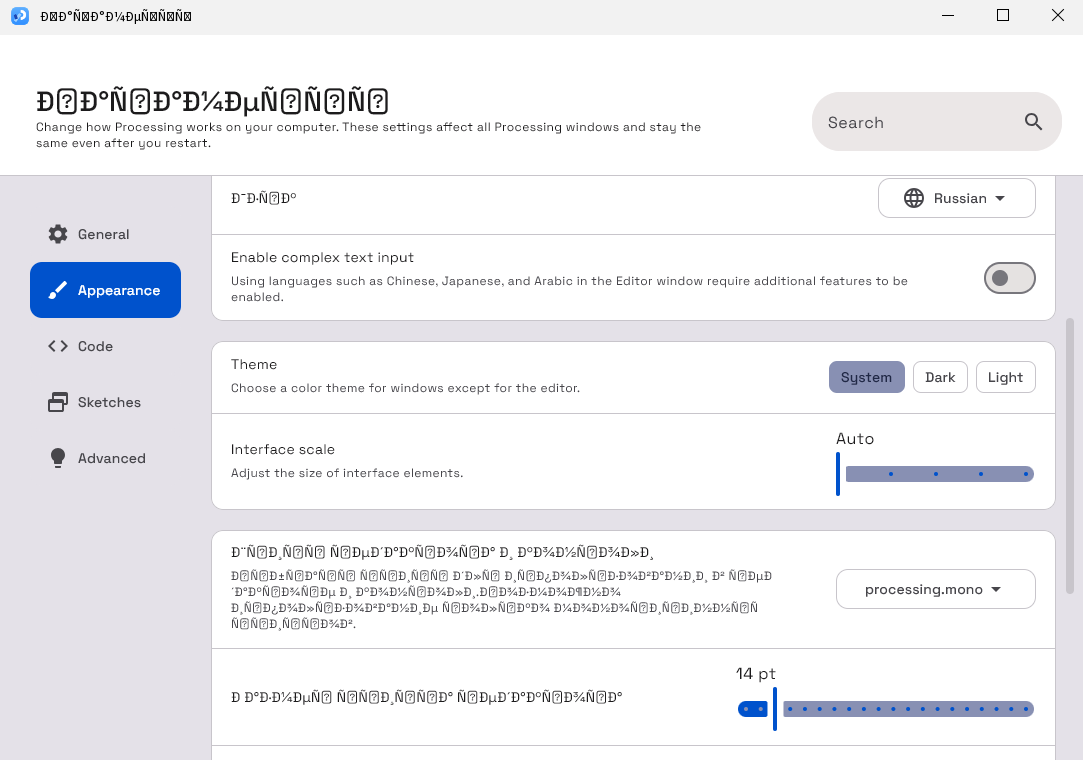
Hi.Words in Russian are not displayed correctly
Hi @glv , the settings from preferences.txt are now directly editable in the “Advanced” tab in Preferences.