Hello @SWijnen ,
You need to know which COM port you are using moving forward to navigate this and find a solution.
A search for USB Enumeration will get you started and then add “Arduino”.
This applies to all USB devices connected.
This behavior may be hardware dependent (see last post).
As you have observed the COM port may change depending on PC and may also change using a different USB Port.
There are different strategies to try for selecting this automatically in code; there is no simple solution.
You can manually assign a COM port to the device on the Windows PC in use:

I have used the jSerialComm library to detect the COM port by name and port:
You can use it alongside the Processing Serial library:
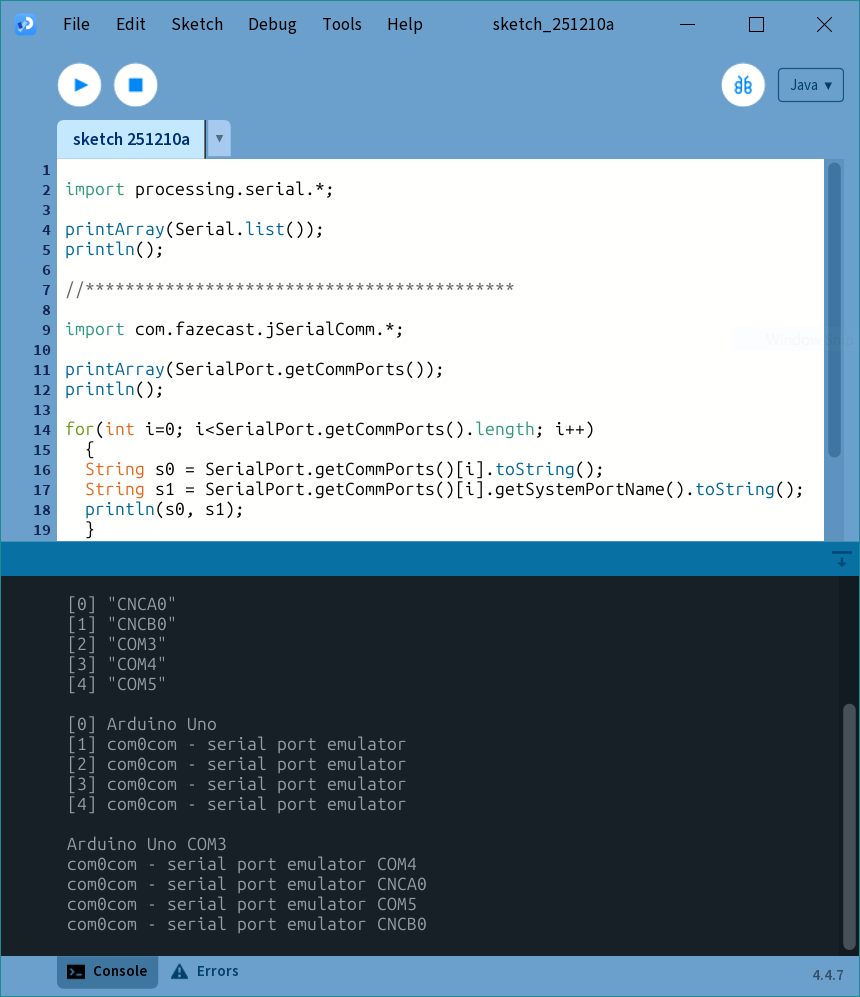
The jSerialComm library gives you a name to find!
You will have to add the library and write the code to iterate through the array to find the COM port you want for the “Arduino Uno”.
A search in the forum may yield other approaches to this with Processing (Java).
There are other approaches with Windows and other programming languages but this may be beyond scope of this project.
To better assist please share:
- Operating system
Windows 10, etc. - Hardware.
Arduino can be a any number of boards including original and clones. - Processing version
You stated 4.2.
Keep in mind the latest version is 4.4.10. - Arduino IDE and version. Should not impact COM port.
- Anything else that may be important!
You may just have to assign manually in the code until this is sorted out.
Prioritize what needs to be done to complete your project.
Keep notes!
This is all good stuff to discuss in your project!
Hint:

It is important to use established naming conventions and the correct capitalization for technical terms in posts, project documentation and future careers.
COM for example and not “com”.
Reference:
COM (hardware interface) - Wikipedia
:)