A few months ago, I published a post about the problems encountered while trying to build a working version of Android Mode for Processing.
After I upgraded to Processing 4.x.x and after I updated my smartphone Android version to 11, I could not build an IDE working configuration. Any Installation procedure I found online that I followed did not help.
I have tens of programs that I developed and used in the past to run in my smartphone and now I am not able to use them. Also, now I am not able to develop new ones anymore.
I am addressing the community Forum again for help to solve this problem.
A step-by-step proven procedure to get a valid and working Processing- Android Mode - SDK configuration would be much appreciated, and I assume much beneficial for many users.
Thanks
glv
June 5, 2026, 12:52pm
2
I found this:
I am surprised that nobody from the Processing forum supervising team has expressed any interest in this issue which has been reported by quite a number of users.
I did post my exploration of this in that topic.
Related:
opened 10:50AM - 27 Apr 26 UTC
OS: MacOS Tahoe M4
When i try to export signed package I get error:
```
The k… eystore could not be created, due to the following error:
The operation couldn’t be completed. Unable to locate a Java Runtime.
Please visit http://www.java.com for information on installing Java.
Build folder: /var/folders/yq/13vj8vws7zv4kfcp4t2_hq8w0000gn/T/android11567373255389557936sketch
WARNING:We recommend using a newer Android Gradle plugin to use compileSdk = 33
This Android Gradle plugin (7.1.0) was tested up to compileSdk = 32
This warning can be suppressed by adding
android.suppressUnsupportedCompileSdk=33
to this project's gradle.properties
The build will continue, but you are strongly encouraged to update your project to
use a newer Android Gradle Plugin that has been tested with compileSdk = 33
> Task :app:preBuild UP-TO-DATE
> Task :app:preReleaseBuild UP-TO-DATE
> Task :app:compileReleaseRenderscript NO-SOURCE
> Task :app:generateReleaseResValues
> Task :app:generateReleaseResources
> Task :app:createReleaseCompatibleScreenManifests
> Task :app:extractDeepLinksRelease
> Task :app:processReleaseMainManifest
> Task :app:processReleaseManifest
> Task :app:processApplicationManifestReleaseForBundle
> Task :app:compileReleaseAidl NO-SOURCE
> Task :app:generateReleaseBuildConfig
> Task :app:javaPreCompileRelease
> Task :app:checkReleaseAarMetadata
> Task :app:checkReleaseDuplicateClasses
> Task :app:mergeReleaseShaders
> Task :app:compileReleaseShaders NO-SOURCE
> Task :app:generateReleaseAssets UP-TO-DATE
> Task :app:mergeReleaseAssets
> Task :app:processReleaseJavaRes NO-SOURCE
> Task :app:mergeReleaseJniLibFolders
> Task :app:mergeReleaseNativeLibs
> Task :app:mergeReleaseResources
> Task :app:collectReleaseDependencies
> Task :app:mergeReleaseJavaResource
> Task :app:stripReleaseDebugSymbols
Unable to strip the following libraries, packaging them as they are: libarcore_sdk_c.so, libarcore_sdk_jni.so.
> Task :app:configureReleaseDependencies
> Task :app:extractReleaseNativeSymbolTables
Unable to extract native debug metadata from /private/var/folders/yq/13vj8vws7zv4kfcp4t2_hq8w0000gn/T/android11567373255389557936sketch/app/build/intermediates/merged_native_libs/release/out/lib/armeabi-v7a/libarcore_sdk_c.so because unable to locate the objcopy executable for the armeabi-v7a ABI.
Unable to extract native debug metadata from /private/var/folders/yq/13vj8vws7zv4kfcp4t2_hq8w0000gn/T/android11567373255389557936sketch/app/build/intermediates/merged_native_libs/release/out/lib/armeabi-v7a/libarcore_sdk_jni.so because unable to locate the objcopy executable for the armeabi-v7a ABI.
Unable to extract native debug metadata from /private/var/folders/yq/13vj8vws7zv4kfcp4t2_hq8w0000gn/T/android11567373255389557936sketch/app/build/intermediates/merged_native_libs/release/out/lib/x86/libarcore_sdk_c.so because unable to locate the objcopy executable for the x86 ABI.
Unable to extract native debug metadata from /private/var/folders/yq/13vj8vws7zv4kfcp4t2_hq8w0000gn/T/android11567373255389557936sketch/app/build/intermediates/merged_native_libs/release/out/lib/x86/libarcore_sdk_jni.so because unable to locate the objcopy executable for the x86 ABI.
Unable to extract native debug metadata from /private/var/folders/yq/13vj8vws7zv4kfcp4t2_hq8w0000gn/T/android11567373255389557936sketch/app/build/intermediates/merged_native_libs/release/out/lib/arm64-v8a/libarcore_sdk_c.so because unable to locate the objcopy executable for the arm64-v8a ABI.
Unable to extract native debug metadata from /private/var/folders/yq/13vj8vws7zv4kfcp4t2_hq8w0000gn/T/android11567373255389557936sketch/app/build/intermediates/merged_native_libs/release/out/lib/arm64-v8a/libarcore_sdk_jni.so because unable to locate the objcopy executable for the arm64-v8a ABI.
Unable to extract native debug metadata from /private/var/folders/yq/13vj8vws7zv4kfcp4t2_hq8w0000gn/T/android11567373255389557936sketch/app/build/intermediates/merged_native_libs/release/out/lib/x86_64/libarcore_sdk_c.so because unable to locate the objcopy executable for the x86_64 ABI.
Unable to extract native debug metadata from /private/var/folders/yq/13vj8vws7zv4kfcp4t2_hq8w0000gn/T/android11567373255389557936sketch/app/build/intermediates/merged_native_libs/release/out/lib/x86_64/libarcore_sdk_jni.so because unable to locate the objcopy executable for the x86_64 ABI.
> Task :app:processReleaseManifestForPackage
> Task :app:parseReleaseIntegrityConfig
> Task :app:writeReleaseAppMetadata
> Task :app:mergeReleaseArtProfile
> Task :app:validateSigningRelease FAILED
> Task :app:bundleReleaseResources
> Task :app:processReleaseResources
> Task :app:desugarReleaseFileDependencies
FAILURE: Build failed with an exception.
* What went wrong:
Execution failed for task ':app:validateSigningRelease'.
> Keystore file '/private/var/folders/yq/13vj8vws7zv4kfcp4t2_hq8w0000gn/T/android11567373255389557936sketch/app/@@keystore_file@@' not found for signing config 'release'.
* Try:
Run with --stacktrace option to get the stack trace. Run with --info or --debug option to get more log output. Run with --scan to get full insights.
* Get more help at https://help.gradle.org
BUILD FAILED in 1s
28 actionable tasks: 28 executed
org.gradle.tooling.BuildException: Could not execute build using connection to Gradle distribution 'https://services.gradle.org/distributions/gradle-7.2-bin.zip'.
```
Also the default SDK updater downloaded `android-33-ext5` and it was unable to produce build that would run on device.
First I needed to actually sign the licence (built in Processing tool did not work for this):
`cd /Users/username/Documents/Processing/android/sdk/cmdline-tools/latest/bin`
`./sdkmanager --licenses`
Instead I have to manually put JAVA on path using:
```
find /Applications/Processing.app -name java -type f
export JAVA_HOME="/Applications/Processing.app/Contents/app/resources/jdk"
export PATH="$JAVA_HOME/bin:$PATH"
```
Then manually downloaded `android-33`:
```
cd /Users/username/Documents/Processing/android/sdk/cmdline-tools/latest/bin
./sdkmanager "platforms;android-33"
```
Also install:
```
./sdkmanager "build-tools;30.0.3"
./sdkmanager "platform-tools"
./sdkmanager "build-tools;30.0.3"
```
Then I was able to run sketch on device. But the build fails. It actually fails to generate keystore in Processing/android/keystore (empty folder)
Consider reporting an issue here:
Processing mode and core library to create Android apps with Processing
This is for Processing but gives you some idea of how to report issues:
Source code for Processing, the software sketchbook and Java-based programming language for students, artists, designers, educators, hobbyists, and creative coders. Includes the core library, and e...
If it is reported in the wrong repository you will be advised.
FYI I am a community member just like you.
:)
svan
June 7, 2026, 12:33am
3
For whatever it’s worth, I just successfully ran the following code on my Samsung Galaxy Tab A8 using the Processing editor version 4.5.2 in Android mode (MacOS Tahoe 26.5):
void setup() {
  fullScreen();
  background(209);
  fill(255, 255, 0);
  rect(200,200,400,400);
}

void draw() {
}
Thanks, SVAN, for this answer.
/
svan
June 7, 2026, 2:52pm
5
I let the Processing IDE do that. Under the menubar at the top of the screen select Tools/Manage Tools… then select “Modes” tab. Make sure Android Mode for Processing 4 is checked.
I used to see a ‘modes’ folder in the Documents/Processing/libraries folder but I no longer see that on my system (MacOS). I do see two Android folders as shown below.
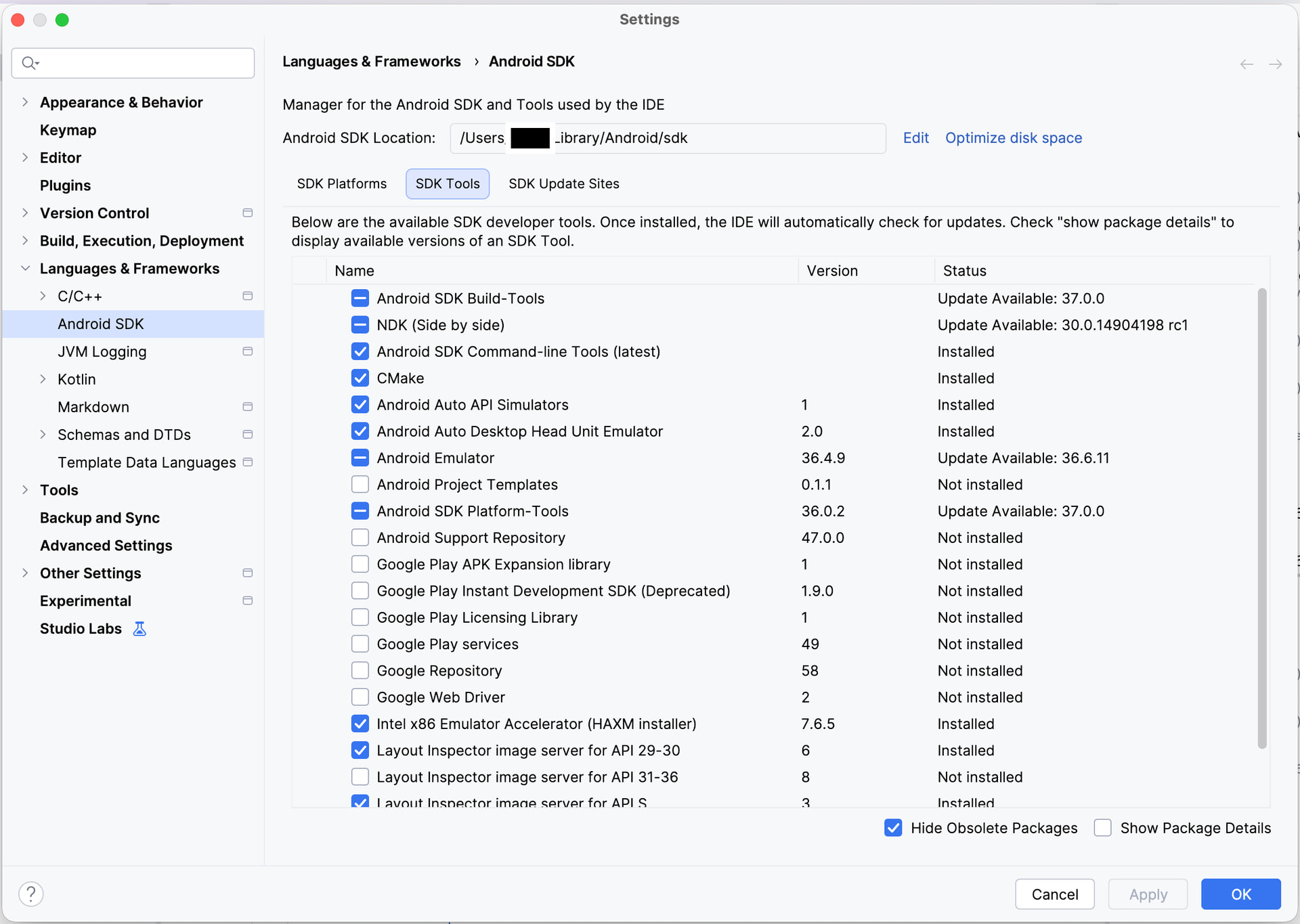
On MacOS the Android sdk is location on the home drive at /Users/xxxxx/Library/Android/sdk . A screenshot of that folder is shown below.
I think that it is important to also have Android Studio installed on your system. It helps set everything up correctly in my experience; I’ve never been able to use it to write Android apps due to the learning curve and have always found writing Android code easier in the Processing IDE. However, others here have been able to use it for creating Android apps.
The main thing with Android Studio is that it helps put all the files in their correct locations. If you create a dummy project you should see the Android menubar across the top of your screen. If you select “Tools” you should see the SDK Manager. I have included screenshots for Settings/SDK Platforms and SDK Tools on my system see you can see what you are able to do with this tool.
I’m using a Samsung Galaxy A8 tablet running Android version 14.
I know it’s convoluted and complicated but hopefully you will be able to get your system up and running.
glv
June 8, 2026, 1:56am
6
Hello @MPROCD ,
Hello @MPROCD ,
I had issues with a fresh install of Android mode and the latest SDK.
I installed Processing 4.5.3 and used an older SDK and it worked!
[Screenshot_20260407-145418.Particles]
Older SDK had this:
[image]
Latest SDK download had this:
[image]
I had to modify the preferences.txt manually to add the SDK location:
[image]
There were issues trying to add it with the new preferences UI (User Interface) so I abandoned that approach.
At first glance it seems that the new SDK…
I was able to add the required version from the command line tools:
The sdkmanager is a command-line tool that allows you to view, install, update, and uninstall packages for the Android SDK.
Do a Google Search for “How to download and install Android SDK 33 (Android 13.0 “Tiramisu”) with command line tools”.
The Google AI Overview provided details.
NOTE:The command line tools are already available to you in the Android SDK folder in your Sketchbook folder.
All I needed was this:
sdkmanager “platforms;android-33” “build-tools;33.0.2”
And was able to run it on the command line from the correct folder:
I was then able to run a sketch on my Android phone.
This worked for me on Windows 10.
UPDATE:
Further exploration suggests that this can be there may be an issue here:
Replace this:
// Platform
// Matches platform packages by target SDK number, so it may match an ext package.
expr = xpath.compile("//remotePackage[starts-with(@path, \"platforms;\")" +
"and contains(@path, '" + AndroidBuild.TARGET_SDK + "')]");
With this:
// Platform
// Require the exact base platform package:
expr = xpath.compile("//remotePackage[@path=\"platforms;android-" + AndroidBuild.TARGE…
:)
yo tambien sufri el problema del maldito “-ext5” en la carpeta del sdk, por suerte chatGPT lo vio por mi y lo corrigió jeje.