The following source code demonstrates JavaFX MeshView for 3D graphics by creating a cube with different images on its faces in the default Processing FX2D window. An underlying TriangleMesh is used. It was designed on MacOS using the Pages app to create a .png image containing the 6 face images, each resized to fit in a 200x200 square. The provided .png image should be added to the sketch folder.
The basis for the cube is an array of eight points arranged in a certain order shown below. The .png image was ‘normalized’ to a 1.0 x 1.0 area and added to each triangle of the mesh. Templates for both the points and textures are also shown below and are complementary, eg 2,3,0 on the points template (front) matches with 8,9,3 on the textures template. Each face has two triangles and each triangle requires 6 integers: pt1, tex1, pt2, tex2, pt3, tex3 (point index, texture index). Counterclockwise winding (order of vertices) is used in both cases.
Source code:
import javafx.scene.canvas.Canvas;
import javafx.scene.layout.StackPane;
import javafx.scene.layout.Pane;
import javafx.scene.AmbientLight;
import javafx.scene.Group;
import javafx.scene.paint.Color;
import javafx.scene.paint.PhongMaterial;
import javafx.scene.shape.MeshView;
import javafx.scene.shape.TriangleMesh;
import javafx.scene.image.Image;
import java.io.FileInputStream;
import java.io.FileNotFoundException;
import javafx.scene.transform.Rotate;
import javafx.animation.RotateTransition;
import javafx.util.Duration;
import javafx.scene.control.Button;

MeshView meshView;

float s = 100;

int _wndW = 500;
int _wndH = 400;

void doRotation(int axis) {
  RotateTransition rt = new RotateTransition(Duration.millis(10000), meshView);
  rt.setByAngle(360); // Rotate 360 degrees
  rt.setCycleCount(RotateTransition.INDEFINITE); // Repeat indefinitely
  rt.setAutoReverse(true); // Rotate back and forth
  if (axis == 0) {
    rt.setAxis(Rotate.X_AXIS);
  } else if (axis == 1) {
    rt.setAxis(Rotate.Y_AXIS);
  } else {
    rt.setAxis(Rotate.Z_AXIS);
  }
  rt.play(); // Start animation
}

void setup() {
  size(_wndW, _wndH, FX2D);
  surface.setTitle("JavaFX MeshView Cube With Images");
  Canvas canvas = (Canvas)surface.getNative();
  StackPane root = (StackPane)canvas.getParent();
  Pane pane = new Pane();
  TriangleMesh mesh = new TriangleMesh();

  mesh.getPoints().addAll(
    -s, -s, s,
    s, -s, s,
    -s, s, s,
    s, s, s,
    -s, -s, -s,
    s, -s, -s,
    -s, s, -s,
    s, s, -s
    );

  // Taken from .png image 'normalized' to a 1.0 x 1.0 coordinate system
  mesh.getTexCoords().addAll(
    0.25, 0.0,   // 0
    0.5, 0.0,    // 1
    0.0, 0.333,  // 2
    0.25, 0.333, // 3
    0.5, 0.333,  // 4
    0.75, 0.333, // 5
    1.0, 0.333,  // 6
    0.0, 0.666,  // 7
    0.25, 0.666, // 8
    0.5, 0.666,  // 9
    0.75, 0.666, //10
    1.0, 0.666, // 11
    0.25, 1.0,  // 12
    0.5, 1.0    // 13
    );

  // Each triangle requires 6 integers: pt1, tex1, pt2, tex2, pt3, tex3 (point index, texture index)
  // counterclockwise winding (order of vertices)

  mesh.getFaces().addAll(
    // Front
    2, 8, 3, 9, 0, 3,
    3, 9, 1, 4, 0, 3,
    // Back
    4, 6, 7, 10, 6, 11,
    7, 10, 4, 6, 5, 5,
    // Top
    4, 0, 1, 4, 5, 1,
    4, 0, 0, 3, 1, 4,
    // Bottom
    7, 13, 3, 9, 2, 8,
    6, 12, 7, 13, 2, 8,
    // Right
    1, 4, 7, 10, 5, 5,
    1, 4, 3, 9, 7, 10,
    // Left
    4, 2, 2, 8, 0, 3,
    4, 2, 6, 7, 2, 8
    );

  meshView = new MeshView(mesh);
  meshView.setLayoutX(250);
  meshView.setLayoutY(200);
  PhongMaterial material = new PhongMaterial();
  try {
    Image image = new Image(new FileInputStream(sketchPath() + "/images.png"));
    material.setDiffuseMap(image);
  }
  catch ( FileNotFoundException e) {
    println("File not found: ", e);
  }
  meshView.setMaterial(material);
  Group group = new Group(meshView, new AmbientLight(Color.WHITE));

  // Controls
  Button btnX = new Button("X");
  btnX.setLayoutX(30);
  btnX.setLayoutY(30);
  btnX.setOnAction(e -> {
    doRotation(0);
  }
  );
  Button btnY = new Button("Y");
  btnY.setLayoutX(60);
  btnY.setLayoutY(30);
  btnY.setOnAction(e -> {
    doRotation(1);
  }
  );
  Button btnZ = new Button("Z");
  btnZ.setLayoutX(90);
  btnZ.setLayoutY(30);
  btnZ.setOnAction(e -> {
    doRotation(2);
  }
  );

  pane.getChildren().addAll(meshView, group, btnX, btnY, btnZ);
  root.getChildren().add(pane);
}
Point Array:
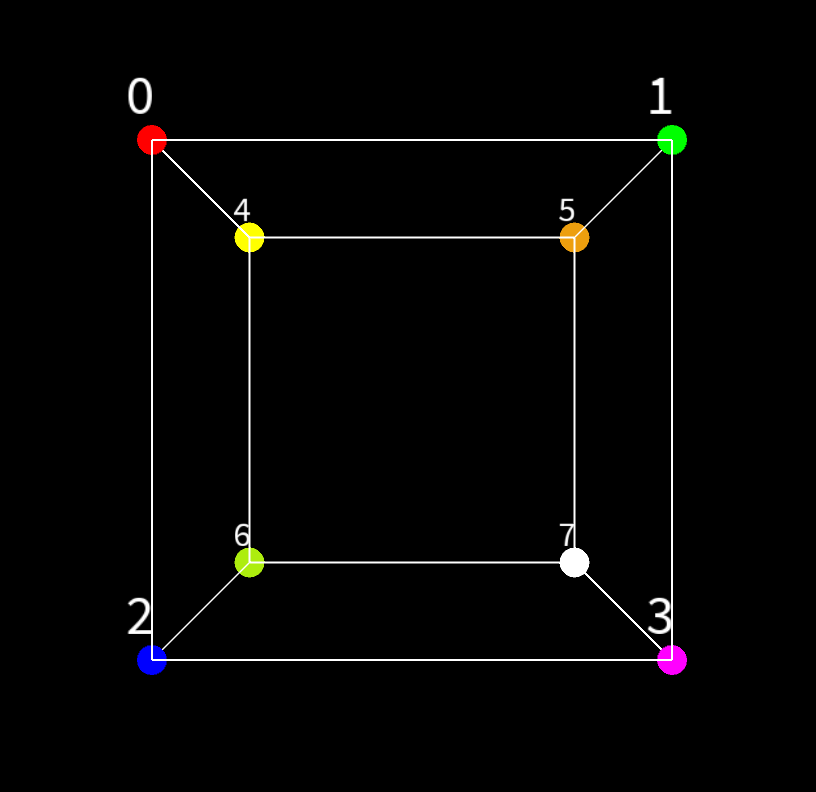
Points Template:

Textures Template:

images.png (copy/paste to sketch folder):
