Hello!package processing.core does not exist”
another example is with an extends call, where it says “cannot find Symbol: class PApplet”
Does anyone know how to solve this? Thank you!
Hi @techsupport2544 and welcome to the forum!
Though it doesn’t exactly answer your question, I wanted to mention there is an official Processing extension for VS Code:
Extension for Visual Studio Code - The easiest way to create and run Processing sketches in VSCode. With syntax highlighting, code completion, error checking, and more.
I would but it is for a requirement that I must use .java files and not rather .pde, hence why I’m trying to import it. Thanks for the idea though, I’ll consider using it on other projects
In that case, Gradle is probably the most convenient option. You can look at the template found here:
https://github.com/processing/processing4/tree/main/java/gradle/example (This is for .pde files but it shouldn’t be too hard to make it work for .java files)
More instructions here: https://github.com/processing/processing4/tree/main/java/gradle
Note that Processing core libraries are published on Maven central:
https://central.sonatype.com/artifact/org.processing/core
Ok I did a bit more digging (with suggestions from Claude Opus 4.7) and the following worked for me:
Project layout
my-sketch/
├── build.gradle.kts
└── src/
    └── main/
        └── java/
            └── MySketch.java
build.gradle.kts
plugins {
    java
    application
}

repositories {
    mavenCentral()
}

dependencies {
    implementation("org.processing:core:4.5.3")
}

application {
    mainClass.set("MySketch")
}

java {
    toolchain {
        languageVersion.set(JavaLanguageVersion.of(17))
    }
}
src/main/java/MySketch.java
import processing.core.PApplet;

public class MySketch extends PApplet {

    public static void main(String[] args) {
        PApplet.main("MySketch", args);
    }

    @Override
    public void settings() {
        size(800, 600);
    }

    @Override
    public void setup() {
        background(0);
    }

    @Override
    public void draw() {
        fill(255);
        noStroke();
        ellipse(mouseX, mouseY, 40, 40);
    }
}
Run with gradle run.
Thanks Raph! The Gradle Plugin also works with .java files out of the box!
glv
May 6, 2026, 1:49am
7
Hello,
P2D and P3D did not work for me with the configuration provided.
I had to copy the these into a new lib folder in root of sketch folder:
And modify build.gradle.kts:
plugins {
    java
    application
}

repositories {
    mavenCentral()
}

dependencies {
    implementation(fileTree("lib") {
        include("*.jar")
    })
}

application {
    mainClass.set("MySketch")
}

java {
    toolchain {
        languageVersion.set(JavaLanguageVersion.of(17))
    }
}
:)
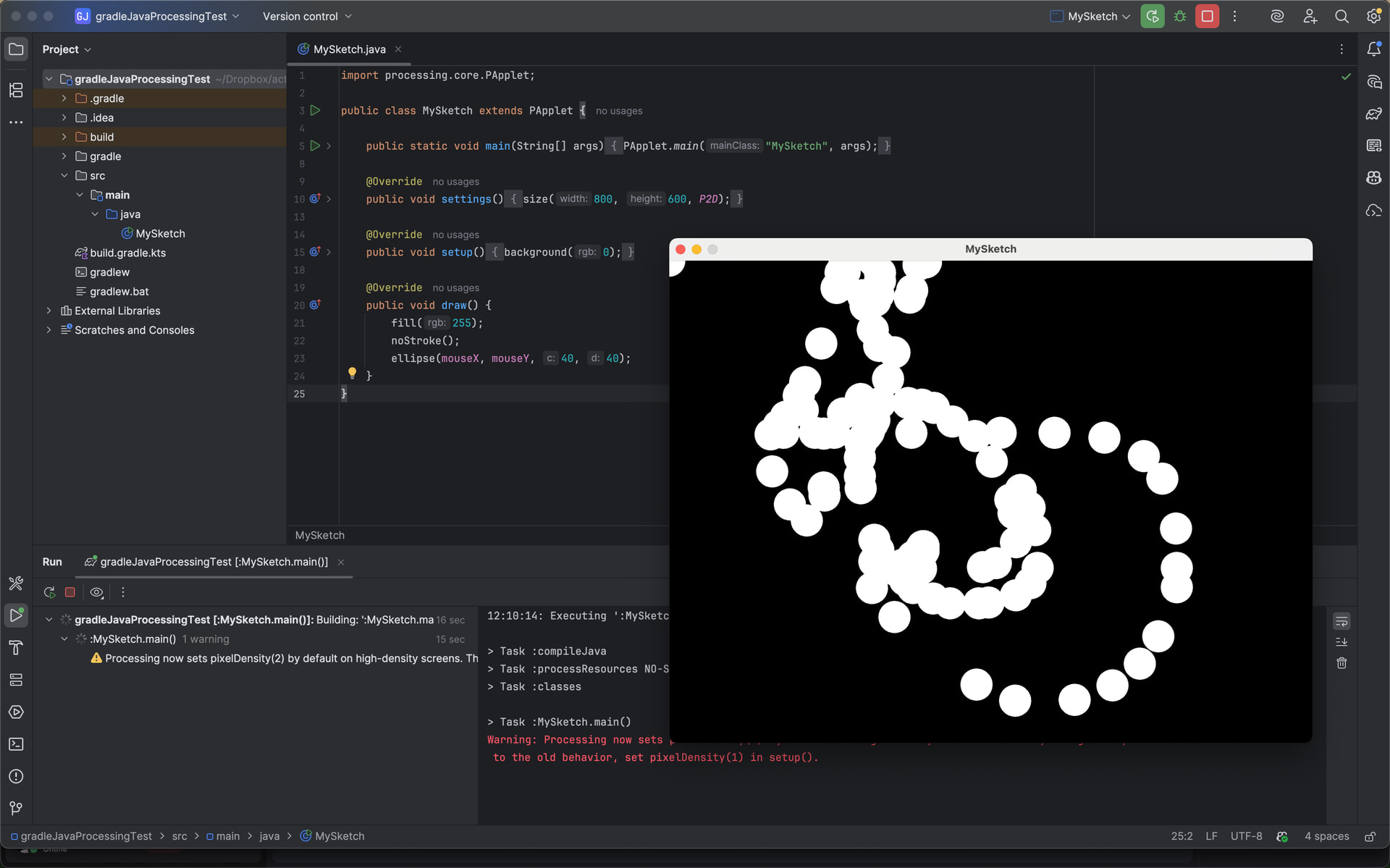
Hmm, that’s strange. I don’t have this issue on my end (see the screenshot below)
Great that you found a workaround. At the same time, it kind of defeats the purpose of using Maven Central if you still have to manually add .jar files to the project
I wonder what is different about your setup. What does the rest of your project look like and what error message did you get when running the Gradle setup suggested above?
glv
May 6, 2026, 3:58pm
11
Hello @sableraph ,
Please share your:build.gradle.kts
I did try variations of this (many) that did not work:
dependencies {
    // 1. Processing Core
    implementation("org.processing:core:4.5.3")

    // 2. JOGL & GlueGen (Core + Natives)
    // Version 2.3.2 is reliable on Maven Central for Windows
    val joglVersion = "2.6.0"
    implementation("org.jogamp.jogl:jogl-all-main:$joglVersion")
    implementation("org.jogamp.gluegen:gluegen-rt-main:$joglVersion")
}
Can you expand your external libraries ?
I am still exploring this.
Thanks!
It’s the same one I shared in my previous message:
plugins {
    java
    application
}

repositories {
    mavenCentral()
}

dependencies {
    implementation("org.processing:core:4.5.3")
}

application {
    mainClass.set("MySketch")
}

java {
    toolchain {
        languageVersion.set(JavaLanguageVersion.of(17))
    }
}
That might be why… I have gluegen and jogl in there. Good catch
@stefterv : Is it meant to work with P2D and P3D? Looks like gluegen and jogl don’t get included by default when importing org.processing:core:4.5.3 from Maven Central.
glv
May 6, 2026, 6:05pm
14
This reference suggests that they need to be added:
opened 08:11PM - 16 Aug 22 UTC
closed 07:14AM - 19 Aug 24 UTC
has attachment
*Created by: clankill3r*
I kind of find a solution for what I'm going to post, … but since it took me over 3 hours I will post something about it anyway so it might help someone in the future.
If you want to use processing outside the PDE (like eclipse, intellij or vscode) you need to point to the core.jar.
If you want to use P2D or P3D you used to add the following jars that could be found inside the processing application:
<img width="300" alt="Image" src="https://github.com/user-attachments/assets/55a8e5ea-3489-4e3e-a448-55411aa8bb62" />
This was at least true till Processing 3.5.4 inclusive.
If you look at how this folder (`Contents/Java/core/library`) now, then you see the following:
<img width="150" alt="Image" src="https://github.com/user-attachments/assets/eafd40ee-5676-46ca-85ce-99ec83ab5c75" />
If you use those files in another editor then you get the following stacktrace (you have to use P2D / P3D).
```
java.lang.UnsatisfiedLinkError: Can't load library: /Users/dw/Desktop/processing_does_not_run_anymore/natives/macosx-universal/gluegen_rt
at java.base/java.lang.ClassLoader.loadLibrary(ClassLoader.java:2393)
at java.base/java.lang.Runtime.load0(Runtime.java:755)
at java.base/java.lang.System.load(System.java:1953)
at com.jogamp.common.jvm.JNILibLoaderBase.loadLibraryInternal(JNILibLoaderBase.java:625)
at com.jogamp.common.jvm.JNILibLoaderBase.access$000(JNILibLoaderBase.java:64)
at com.jogamp.common.jvm.JNILibLoaderBase$DefaultAction.loadLibrary(JNILibLoaderBase.java:107)
at com.jogamp.common.jvm.JNILibLoaderBase.loadLibrary(JNILibLoaderBase.java:488)
at com.jogamp.common.os.DynamicLibraryBundle$GlueJNILibLoader.loadLibrary(DynamicLibraryBundle.java:427)
at com.jogamp.common.os.Platform$1.run(Platform.java:321)
at java.base/java.security.AccessController.doPrivileged(AccessController.java:318)
at com.jogamp.common.os.Platform.<clinit>(Platform.java:290)
at com.jogamp.nativewindow.NativeWindowFactory$1.run(NativeWindowFactory.java:239)
at java.base/java.security.AccessController.doPrivileged(AccessController.java:318)
at com.jogamp.nativewindow.NativeWindowFactory.<clinit>(NativeWindowFactory.java:236)
at com.jogamp.newt.NewtFactory$1.run(NewtFactory.java:69)
at java.base/java.security.AccessController.doPrivileged(AccessController.java:318)
at com.jogamp.newt.NewtFactory.<clinit>(NewtFactory.java:66)
at processing.opengl.PSurfaceJOGL.initIcons(PSurfaceJOGL.java:475)
at processing.opengl.PSurfaceJOGL.initFrame(PSurfaceJOGL.java:147)
at processing.core.PApplet.initSurface(PApplet.java:10315)
at processing.core.PApplet.runSketch(PApplet.java:10221)
at processing.core.PApplet.main(PApplet.java:9997)
at processing.core.PApplet.main(PApplet.java:9969)
at test.Test.main(Test.java:8)
```
I keep it short from here on, I found this topic:
https://forum.jogamp.org/Gluegen-rt-Can-t-find-Natives-on-Eclipse-td4038593.html
Which had the following answer:
> Hey
>
> Try to use [jogamp-fat.jar](http://jogamp.org/deployment/archive/rc/v2.3.2/fat/jogamp-fat.jar) instead. If it doesn't work, it probably means that your version of OS X is too old. Mac OS X Lion is terribly outdated and supporting OS X in general is sometimes a nightmare, we do our best.
So I downloaded `jogamp-fat.jar` from:
https://jogamp.org/deployment/archive/rc/v2.4.0-rc-20210111/fat/
and removed everything till I only have those 2 files:
<img width="150" alt="Image" src="https://github.com/user-attachments/assets/3cc737c9-d0fc-4cdc-b943-b0114ed56d2d" />
Also looking at build.xml, I wonder if it wouldn't be easier if processing would use this jar instead as well. It could almost half the amount of lines in build.xml.
On a positive note I have improved my workflow with VS Code.
This worked as well (gets the core and I added requried libs for P2D/P3D) at my end:
:)
That comment pre-dates the Gradle template though, and there’s been a lot of effort going into improving the experience of using Processing outside the PDE, especially thanks to Stef’s work with Gradle, so I should hope there is a way for this setup to work without manually adding .jar files to your project
glv
May 6, 2026, 10:52pm
17
Hello @sableraph ,
I managed to get it working with this on Windows 10:
Thanks @noah-devtech !
It worked as is!
I scaled it down for my use case with VS Code and JAVA2D, P2D and P3D on Windows 10 and it worked.
I only used this file:
build.gradle.kts
plugins {
id("java")
id("application")
}
repositories {
mavenCentral()
}
java {
toolchain {
languageVersion.set(JavaLanguageVersion.of(17))
}
}
val processingVersion = "4.5.3"
val joglVersion = "2.6.0"
dependencies {
implementation("org.processing:core:$processingVersion")
/…
:)
is it possible to do without gradle? Or is it designed around it?
glv
May 7, 2026, 12:41am
19
Yes.
This was what I did initially:
I had a couple Java versions so had to tell it which one to use.
A couple ways:
You can search for the JAR files to find the correct path.
I may not be using the recommended directory structure since I was just testing.
:)
you didn’t get intellisense errors?
Maven Central: org.processing:core Strange, it does list the dependencies here
@glv I tried with a clean project outside of IntelliJ and it does run for me:
I even did a more isolated build from a temporary Gradle home directory by running:
TMP=$(mktemp -d)
GRADLE_USER_HOME=$TMP gradle run
It redownloaded the dependencies and ran without errors:
glv
May 8, 2026, 11:51am
24
Hello @techsupport2544 ,
In the method here (copy JARs to lib folder) I did not get IntelliSense errors:
Yes.
This was what I did initially:
[image]
I had a couple Java versions so had to tell it which one to use.
A couple ways:
Copy the required JAR files to a lib folder. I did that in my example.
Link to them directly:
Managing Java Projects in VS Code Not tested!
You can search for the JAR files to find the correct path.
I may not be using the recommended directory structure since I was just testing.
These are extensions enable so there are no surprises:
This topic is marked as solved so I will be ending my participation in this.
I am still exploring this…
:)