# What can you create in Processing?
**URL:** https://discourse.processing.org/t/what-can-you-create-in-processing/42386
**Category:** Project Guidance
**Created:** [July 9, 2023, 7:21pm UTC](https://discourse.processing.org/t/what-can-you-create-in-processing/42386 "2023-07-09T19:21:39Z")
**Posts on this page:** 9
**Page:** 1
### Author:  [@nuhuhwy](https://discourse.processing.org/u/nuhuhwy)
#### Post date: [July 9, 2023, 7:21pm UTC](https://discourse.processing.org/t/what-can-you-create-in-processing/42386/1 "2023-07-09T19:21:39Z")
I have a little experience with some small processing android apps I made and a pc app thats a file system viewer.
What else is there to make?
Games, software. But how could you make something like a game that’s very complicated or a software like krita.
I mean obviously I cant make like krita the drawing app, because I don’t even know how to make a simple line drawing thing.
---
### Author:  [@quark](https://discourse.processing.org/u/quark)
#### Post date: [July 9, 2023, 7:33pm UTC](https://discourse.processing.org/t/what-can-you-create-in-processing/42386/2 "2023-07-09T19:33:59Z")
> [@nuhuhwy](#):
>
> But how could you make something like a game that’s very complicated
It would require
1. some imagination
2. lots of time
3. appropriate level of programming development skills
Most find the last point the most challenging part.
Creating something _large and complicated_ involves breaking it down into many tasks that are _small and simple_.
---
### Author:  [@Chrisir](https://discourse.processing.org/u/Chrisir)
#### Post date: [July 9, 2023, 8:40pm UTC](https://discourse.processing.org/t/what-can-you-create-in-processing/42386/3 "2023-07-09T20:40:13Z")
there are examples of drawing:
see [Continuous Lines / Examples / Processing.org](https://processing.org/examples/continuouslines.html)
> **[Patterns / Examples](https://processing.org/examples/pattern.html)**
>
> Move the cursor over the image to draw with a software tool which responds to the speed of the mouse.
> **[Pulses / Examples](https://processing.org/examples/pulses.html)**
>
> Software drawing instruments can follow a rhythm or abide by rules independent of drawn gestures. This is a form of collaborative drawing in which the draftsperson controls some aspects of the image a…
or here where you can switch between drawing cirlce / line
```auto
// draw program
// rubber = rubber
PFont font;
//PShape ellipse;
color currentFill=color(111);
ArrayList buttons = new ArrayList();
boolean hold=false;
// define modes
final int lineMode = 0;
final int circleMode = 1;
final int rubberMode = 2;
//current mode
int mode = lineMode;
// names of modes
String[] stringMode={ "line",
"circle (drag mouse)",
"rubber"};
// draw a circle variables
boolean drawNewCircle; // During mouse dragging we can still abort the circle with ESC and change its size with the mouse
PVector startCircle=new PVector();
float diameter;
void setup() {
size(768, 1024);
PImage rubber;
PImage save;
PImage delete;
PImage circle;
background(255);
rubber = loadImage("gomme.png");
save = loadImage("save.png");
delete = loadImage("delete.png");
circle = loadImage("circle.png");
//ellipse = loadShape("ellipse.svg");
// font = loadFont("Grotex-Regular-48.vlw");
// textFont(font);
defineButton(rubber, "rubber", 600, 20, 64, 74);
defineButton(save, "save", 520, 20, 64, 74);
defineButton(delete, "delete", 680, 20, 64, 74);
//shape(ellipse, 300, 380, 188, 188);
defineButton(circle, "circle (on/off)", 400, 20, 188, 188);
}
void draw() {
helpTextUpperLeftCorner();
// display buttons
for (Button b : buttons) {
b.display();
}
textSize(48);
text("un soleil", 20, 60);
fill(210);
stroke(0);
strokeWeight(6);
if (!hold) {
switch(mode) {
case circleMode:
// ignore
break;
case lineMode:
if (mousePressed) {
line(mouseX, mouseY, pmouseX, pmouseY);
}
break;
case rubberMode:
//
if (mousePressed) {
fill(255);
noStroke();
rect(mouseX, mouseY, 3, 3);
}
break;
default:
//Error
break;
}//switch
}//if
// During mouse dragging we can still abort the circle with ESC and change its size with the mouse
if (drawNewCircle) {
// delete old circle
stroke(255);
fill(255);
strokeWeight(3);
ellipse( startCircle.x, startCircle.y, diameter, diameter);
// show circle with current size diameter
stroke(0);
noFill();
strokeWeight(1);
diameter = 2 * dist (mouseX, mouseY,
startCircle.x, startCircle.y);
stroke(0);
ellipse( startCircle.x, startCircle.y, diameter, diameter);
}//if
//
}
// -----------------------------------------------------
void helpTextUpperLeftCorner() {
//
textAlign(LEFT);
fill(255);
noStroke();
rect(0, 0, width, 30);
fill(0);
textSize(17);
if (drawNewCircle) {
text("drag mouse to resize circle, ESC to abort", 22, 22);
} else {
text("mode is " + stringMode[mode], 22, 22);
}//else
// default
fill(210);
}//func
void mousePressed() {
for (Button b : buttons) {
if (b.over()) {
exec(b.id);
hold=true;
return;
}//if
}//for
if (mode==circleMode) {
startCircle.x=mouseX;
startCircle.y=mouseY;
drawNewCircle=true;
diameter=0;
}
}
void mouseReleased() {
if (drawNewCircle) {
// finish the circle in red
noStroke();
fill(currentFill);
ellipse( startCircle.x, startCircle.y, diameter, diameter);
}
hold=false;
drawNewCircle=false;
diameter=0;
}
// ------------------------------------------------------------
void keyPressed() {
if (key==ESC) {
key=0;
if (drawNewCircle) {
stroke(255);
fill(255);
strokeWeight(3);
ellipse( startCircle.x, startCircle.y, diameter, diameter);
hold=false;
drawNewCircle=false;
diameter=0;
}
}
// COLORS
else if (key=='0') {
currentFill=color(255, 0, 0);
} else if (key=='1') {
currentFill=color(0, 255, 0);
} else if (key=='2') {
currentFill=color(0, 0, 255);
} else if (key=='3') {
currentFill=color(0);
} else if (key=='4') {
currentFill=color(201);
} else if (key=='5') {
currentFill=color(34);
} else if (key=='6') {
currentFill=color(255, 248, 44);
}
}
// -------------------------------------------------------------------
void exec(int id) {
// execute commands
println(id);
switch (id) {
case 0:
mode=rubberMode;
break;
case 1:
//
save("zrewuizwre.png");
break;
case 2:
background(255);
break;
case 3:
if (mode!=circleMode)
mode=circleMode;
else
mode=lineMode;
break;
default:
break;
}//switch
}
void defineButton(PImage img,
String s,
float x, float y,
float w, float h) {
buttons.add (new Button(img, s, x, y, buttons.size()));
}
//===================================================================
class Button {
PImage img=null;
String s;
float x, y;
int id;
Button(PImage img_,
String s_,
float x_, float y_,
int id_) {
img=img_;
s=s_;
x=x_;
y=y_;
id=id_;
}
void display() {
if (img!=null) {
imageMode(CENTER);
image(img, x, y);
return;
}
textAlign(CENTER);
textSize(17);
text(s, x, y);
textAlign(LEFT);
}//
boolean over() {
return
dist (mouseX, mouseY, x, y) < 30;
}
//
}//class
//
```
---
### Author:  [@jafal](https://discourse.processing.org/u/jafal)
#### Post date: [July 9, 2023, 9:07pm UTC](https://discourse.processing.org/t/what-can-you-create-in-processing/42386/4 "2023-07-09T21:07:18Z")
Hi
Games
> **[Games - OpenProcessing](https://openprocessing.org/curation/25/)**
>
> This collection includes games that are built with Processing. Enjoy!
---
### Author:  [@Chrisir](https://discourse.processing.org/u/Chrisir)
#### Post date: [July 9, 2023, 9:07pm UTC](https://discourse.processing.org/t/what-can-you-create-in-processing/42386/5 "2023-07-09T21:07:54Z")
more interesting is generative art, where the Sketch does the drawing / art

---
### Author:  [@JoseMY](https://discourse.processing.org/u/JoseMY)
#### Post date: [July 13, 2023, 8:22am UTC](https://discourse.processing.org/t/what-can-you-create-in-processing/42386/6 "2023-07-13T08:22:13Z")
This is a Mobile Screensaver for android. Unluckily, animated screensavers are being removed from android devices. I had many troubles to add this one to my 2018 Samsung note 8:
> **[GitHub - jgmy/serpientemagica: A processing implementation of the Serpiente...](https://github.com/jgmy/serpientemagica#serpientemagica)**
>
> A processing implementation of the Serpiente Mágica (Magic Snake, Rubik's snake) 80s toy. - GitHub - jgmy/serpientemagica: A processing implementation of the Serpiente Mágica (Magic Snake, Rubi...

This is a Kaleidoscope for android. It used the ketai library, wich I think is outdated now:
> **[GitHub - jgmy/caleidoscopio-JG: A camera kaleidoscope made with processing](https://github.com/jgmy/caleidoscopio-JG#caleidoscopio-jg)**
>
> A camera kaleidoscope made with processing. Contribute to jgmy/caleidoscopio-JG development by creating an account on GitHub.
Finally, this is a Vision Aid software i developed to aid myself
tell the difference between green and brown, cyan and pink, dark red and black, and so on. I eventually used it to see an old film intended to use special “spooky” glasses:
> **[GitHub - jgmy/daltonaid: A realtime camera filter to aid colorblind people...](https://github.com/jgmy/daltonaid)**
>
> A realtime camera filter to aid colorblind people like me distinguish red from black and pink/magenta from blue. - GitHub - jgmy/daltonaid: A realtime camera filter to aid colorblind people like me...

---
### Author:  [@JoseMY](https://discourse.processing.org/u/JoseMY)
#### Post date: [July 13, 2023, 8:34am UTC](https://discourse.processing.org/t/what-can-you-create-in-processing/42386/7 "2023-07-13T08:34:43Z")
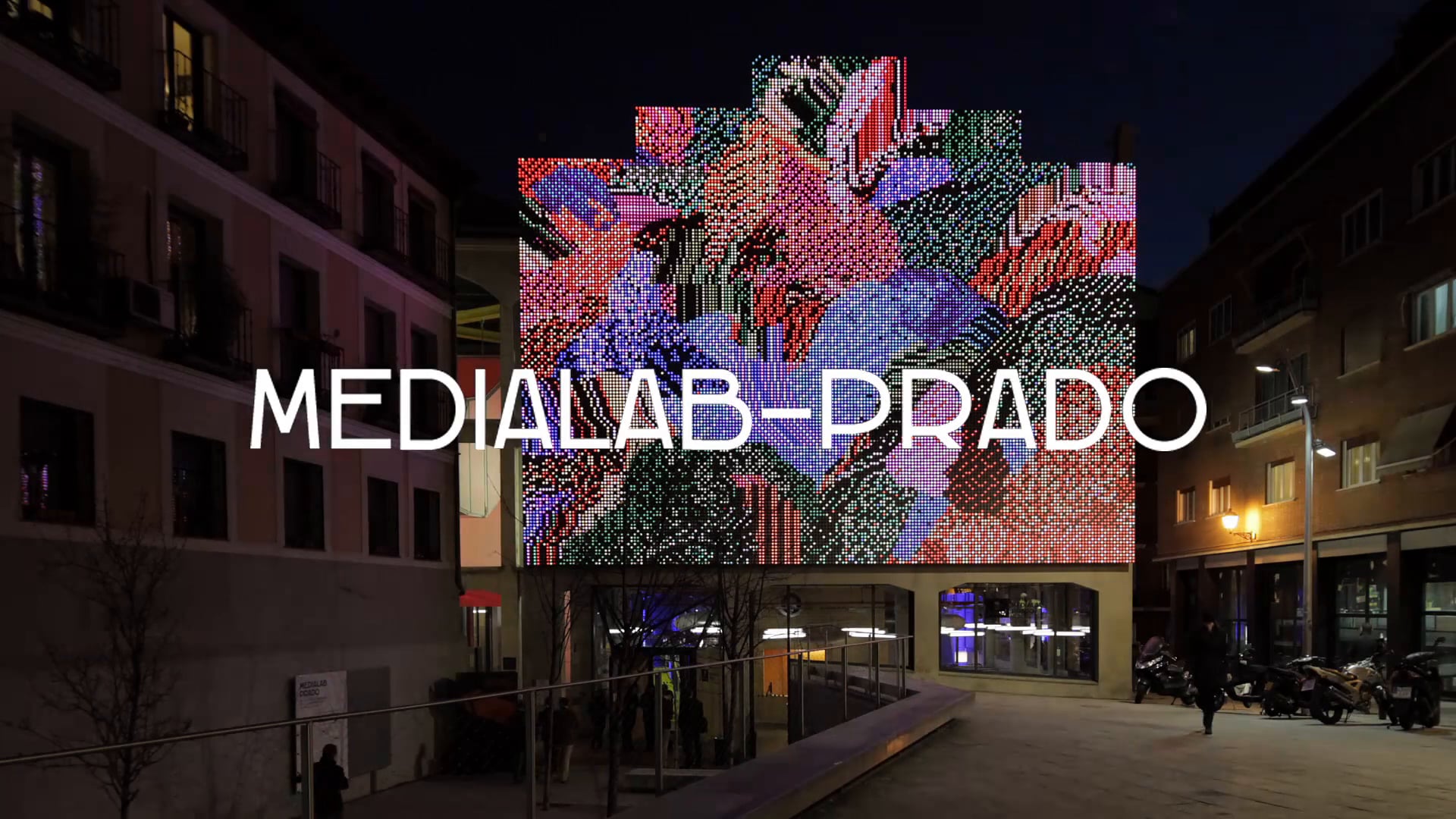
Processing was also used to “boost” the interactive media wall at former MediaLab Prado, Alameda 15, 28014 Madrid Spain. The place was recycled into Serrería Belga Exhibition Hall; the media wall is still there but obsoleted and turned off.
The videogames you see at the beggining of this video are made with processing.js. Players ran on the square , a camera detected movement, and then a computer vision library moved the ship following players.
[ ](https://vimeo.com/90344591)
---
### Author:  [@glv](https://discourse.processing.org/u/glv)
#### Post date: [July 13, 2023, 10:51am UTC](https://discourse.processing.org/t/what-can-you-create-in-processing/42386/8 "2023-07-13T10:51:45Z")
> [@nuhuhwy](#):
>
> What else is there to make?
Take a look at links on the Processing website:
> **[Welcome to Processing!](https://processing.org/)**
>
> Processing is a flexible software sketchbook and a language for learning how to code. Since 2001, Processing has promoted software literacy within the visual arts and visual literacy within technology…
> **See what others are making**
is on the bottom left of the page.
Some cool hardware and software here:
> **[Open Source Tools for Neuroscience](https://openbci.com)**
>
> We provide anyone with a computer, the tools necessary to sample the electrical activity of their body. Our versatile and affordable bio-sensing microcontrollers can be used to sample electrical brain activity (EEG), muscle activity (EMG), heart rate...
See downloads for the Processing files.
`:)`
---
### Author:  [@glv](https://discourse.processing.org/u/glv)
#### Post date: [July 15, 2023, 1:06pm UTC](https://discourse.processing.org/t/what-can-you-create-in-processing/42386/9 "2023-07-15T13:06:13Z")
Adding to the list…
> **[20th Anniversary Processing Community Catalog : Processing Foundation : Free...](https://archive.org/details/processing-community-catalog-2021/page/n47/mode/2up)**
>
> “What does being a part of the Processing community mean to you?” In response to this question from our community of contributors, we’ve created a...
> [@Places online where documentation of amazing projects exist](https://discourse.processing.org/t/places-online-where-documentation-of-amazing-projects-exist/3601):
>
> I’ve been hoping to compile a list of places / resources to look at amazing and successful projects of folks working in creative coding & code based art projects. It’s the nature of the web, but these resources feel super scattered. I thought having a more community oriented effort to put some of these resources together might be super helpful, especially for students. I’m generally thinking of this in two types of shares, as outlined below. As a general rule of thumb, don’t share your own link …
And check out the Gallery category for some cool stuff!
> [@"2001: A Space Odyssey" retold using Processing](https://discourse.processing.org/t/2001-a-space-odyssey-retold-using-processing/13864):
>
> Hello World and dear Processing community! Here’s my first Processing project I’d like to share with you guys. The idea: feed the program with a database of images calculate the average color of each image in the database feed the program with an input image rasterize/split the input image into several equal cells calculate the average color of each cell replace each cell with the next best color match from the database I was looking for something like this: [3f8fd3fd728eb2999fea62f4dac832…
`:)`