# Takashi Murakami Code
**URL:** https://discourse.processing.org/t/takashi-murakami-code/44758
**Category:** Coding Questions
**Tags:** homework
**Created:** [July 12, 2024, 5:29pm UTC](https://discourse.processing.org/t/takashi-murakami-code/44758 "2024-07-12T17:29:50Z")
**Posts on this page:** 4
**Page:** 1
### Author:  [@chipadelic](https://discourse.processing.org/u/chipadelic)
#### Post date: [July 12, 2024, 5:29pm UTC](https://discourse.processing.org/t/takashi-murakami-code/44758/1 "2024-07-12T17:29:50Z")
Hey Everyone!
i am struggling to figure out how to create the Takashi Murikami flower using shapes, bezier curves, vertecies and shapes. this is a little above and beyond for the class that I am taking, and i am really hoping there is a way to do it. Either just one large flower of his in the center or a way to create a repeating pattern of flowers. Any help would be very very much appreciated! thanks in advance 🙂


---
### Author:  [@Chrisir](https://discourse.processing.org/u/Chrisir)
#### Post date: [July 12, 2024, 7:06pm UTC](https://discourse.processing.org/t/takashi-murakami-code/44758/2 "2024-07-12T19:06:39Z")
Hello!
Start step by step.
Use the reference for commands and examples. [Reference / Processing.org](https://processing.org/reference)
**First**
First, draw the big circle in the center - write a comment above the line
```auto
// face
fill(...);
circle(...); // https://processing.org/reference/circle_.html
```
Run sketch and check for errors
**Second**
draw 2 circles - the eyes - write a comment
```auto
// eyes
fill(...);
circle(...);
circle(...);
```
Run sketch and check for errors
**Third**
use arc() command for the mouth like a lying D - with comment
```auto
//mouth
fill(...);
arc(...);
```
**Four**
then use a for loop for the leaves:
```auto
// leaves
for (...) {
fill(..);
....
ellipse(x,y,...);
}
```
Chrisir
---
### Author:  [@glv](https://discourse.processing.org/u/glv)
#### Post date: [July 13, 2024, 12:52pm UTC](https://discourse.processing.org/t/takashi-murakami-code/44758/3 "2024-07-13T12:52:15Z")
Hello @chipadelic ,
Explore the resources (tutorials, references, examples, etc.) here:
_[https://processing.org](https://processing.org)_
This may be of interest:
> **[2D Transformations](https://processing.org/tutorials/transform2d/)**
>
> Learn how to translate, rotate, and scale shapes using 2D transformations.
There is a good example in there:

These are the steps I took:
- explore the shape of the petal with some math, lines and placement of circle
- draw circle
- create a triangle shape with vertices
- draw the triangle shape on top of circle
- draw petal shapes in a _for()_ loop
- draw the circle last on top of petals
- the above overlaps shapes… a simple start
- order is important
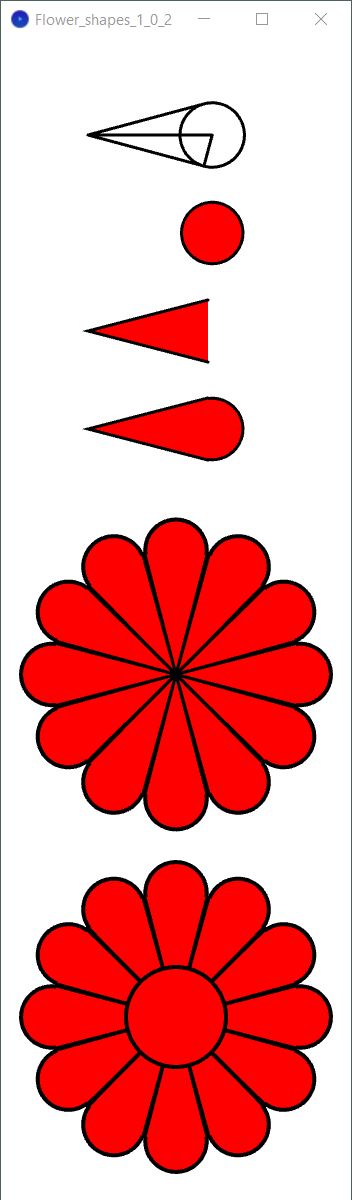
I took advantage of _colorMode(HSB, 12, 100, 100)_ for this:

This is an achievable exercise if you put some work into it.
Initially I did not use math and placed shapes manually… you will learn a lot about the method and it’s parameters doing this and can then apply the math if desired.
I used tangents to circles once I applied the math to a petal:

I did a lot of exploration with this including arc(), bezierVertex(), etc. and came up with a few solutions and a custom shape.
Keep at it!
`:)`
---
### Author:  [@quark](https://discourse.processing.org/u/quark)
#### Post date: [July 13, 2024, 1:08pm UTC](https://discourse.processing.org/t/takashi-murakami-code/44758/4 "2024-07-13T13:08:36Z")
Effectively you are trying to draw a composite shape - a shape made from several others in 2D. In computer graphics this is a common programing task so I am going to provide a fairly detailed answer but with minmal code - after all there should be some challenge 😁
When creating a composite shape there are a number of extremely important methods that you need to become familiar with. These methods are not used to render a shape but rather transform the XY axis used to position the shapes. They are `translate(x,y)`, `rotate(angle)`, `push()` and `pop()` and you should look these up in the reference if you are unfamiliar with them.
Stage 1 : Modular design
We can break this problem into a number of tasks and sub tasks
```
Draw Flower
|-- draw petals
| |-- draw a petal (repeat for each petal
|-- draw face
|-- draw face background
|-- draw mouth
|-- draw eyes
|-- draw left eye
|-- draw right eye
```
We can create a series of functions for each task this bit shows the first three tasks with basic code to manage transformations.
```auto
void drawFlower(float x, float y) {
push(); // save the transfprmatiom matrix
translate(x, y); // move axis to centre of flower to draw
drawPetals();
/* Now do the rest
|-- draw face
|-- draw face background
|-- draw mouth
|-- draw eyes
|-- draw left eye
|-- draw right eye
*/
pop(); // restore the transfprmatiom matrix
}
void drawPetals() {
push();
float deltaAngle = TWO_PI/12;
for (int i = 0; i < 12; i++) {
drawPetal();
rotate(deltaAngle);
}
pop();
}
void drawPetal() {
// push & pop not required because rotation is cumulative
// and controlled in calling function
// Some maths needed here LOL
}
```
**Drawing the petal**

The code for drawing a single petal is the _same_ for every petal ,we simply rotate the axis for drawing each petal.
In the image the point O has the coordinates [0, 0]. If we define the size of the petal (r) as the length \overrightarrow{OA} then we can calculate the coordinates for A, B and C as
A = [r .cos(ang/2), r.sin(ang/2)]
B = [r .cos(ang/2), -r.sin(ang/2)]
C = [r .cos(ang/2), 0]
and finally the radius of the semi-circle \overrightarrow{CD} equals r.sin(ang/2)
Knowing these values the patal can be draw using `triangle(...)` and `arc(...)` methods.