# Realtime image processing using thread(); or class extending thread
**URL:** https://discourse.processing.org/t/realtime-image-processing-using-thread-or-class-extending-thread/30304
**Category:** Processing for Android
**Created:** [May 26, 2021, 7:33am UTC](https://discourse.processing.org/t/realtime-image-processing-using-thread-or-class-extending-thread/30304 "2021-05-26T07:33:33Z")
**Posts on this page:** 18
**Page:** 2
### Author:  [@doni](https://discourse.processing.org/u/doni)
#### Post date: [May 27, 2021, 5:33pm UTC](https://discourse.processing.org/t/realtime-image-processing-using-thread-or-class-extending-thread/30304/21 "2021-05-27T17:33:02Z")
its amazing the performance is so great thank you so much. does the shader using multi thread within .glsl file?? i gues not??
---
### Author:  [@doni](https://discourse.processing.org/u/doni)
#### Post date: [May 27, 2021, 5:35pm UTC](https://discourse.processing.org/t/realtime-image-processing-using-thread-or-class-extending-thread/30304/22 "2021-05-27T17:35:06Z")
thank you brother learn many thing from you especially raw pixel
---
### Author:  [@doni](https://discourse.processing.org/u/doni)
#### Post date: [May 27, 2021, 5:40pm UTC](https://discourse.processing.org/t/realtime-image-processing-using-thread-or-class-extending-thread/30304/23 "2021-05-27T17:40:33Z")
hi brother could i use shaders to improve fps and computing in facerecognition also combining opencv library? thank you
---
### Author:  [@Shwaa](https://discourse.processing.org/u/Shwaa)
#### Post date: [May 27, 2021, 5:44pm UTC](https://discourse.processing.org/t/realtime-image-processing-using-thread-or-class-extending-thread/30304/24 "2021-05-27T17:44:07Z")
I’m not actually sure. I don’t have much experience with computer vision, I just know a bit about shaders. If you can solve a problem by running code on individual pixels, that’s what shaders are for. It’s up to you to figure out how to apply shaders in future projects.
---
### Author:  [@doni](https://discourse.processing.org/u/doni)
#### Post date: [May 27, 2021, 5:58pm UTC](https://discourse.processing.org/t/realtime-image-processing-using-thread-or-class-extending-thread/30304/25 "2021-05-27T17:58:07Z")
hi brother do you know what web or youtube tutorial which i could learn creating fragment shaders file from? thank you
---
### Author:  [@Shwaa](https://discourse.processing.org/u/Shwaa)
#### Post date: [May 27, 2021, 5:58pm UTC](https://discourse.processing.org/t/realtime-image-processing-using-thread-or-class-extending-thread/30304/26 "2021-05-27T17:58:54Z")
You can use the Shader tutorial for processing: [Shaders \ Processing.org](https://processing.org/tutorials/pshader/)
---
### Author:  [@neilcsmith](https://discourse.processing.org/u/neilcsmith)
#### Post date: [May 27, 2021, 8:28pm UTC](https://discourse.processing.org/t/realtime-image-processing-using-thread-or-class-extending-thread/30304/27 "2021-05-27T20:28:55Z")
> [@doni](#):
>
> does the shader using multi thread
Yes. Shaders are automatically parallelized on the GPU. I didn’t suggest like @Shwaa because by the time you’ve done `loadPixels()` on a GL backed PGraphics you often don’t really win. It’s doing all the same raw pixel looping to get and transform the data from the GPU. Where you can keep the data on the GPU, shaders are far better.
---
### Author:  [@paulgoux](https://discourse.processing.org/u/paulgoux)
#### Post date: [May 28, 2021, 12:16am UTC](https://discourse.processing.org/t/realtime-image-processing-using-thread-or-class-extending-thread/30304/28 "2021-05-28T00:16:43Z")
The book of shaders can be found online and is pretty good, although some of its advanced chapters are empty.
I would also make us of [https://community.khronos.org/](https://community.khronos.org/)
And of course the best way to learn is to look for actual examples, shadertoy can help.
---
### Author:  [@doni](https://discourse.processing.org/u/doni)
#### Post date: [June 22, 2021, 4:51pm UTC](https://discourse.processing.org/t/realtime-image-processing-using-thread-or-class-extending-thread/30304/30 "2021-06-22T16:51:00Z")
> [@Shwaa](#):
>
> ```auto
> float dist = sqrt((b.x - a.x) * (b.x - a.x) + (b.y - a.y) * (b.y - a.y) + (b.z - a.z) * (b.z - a.z));
> bool cond = dist < threshold * sqrt(3);
>
> ```
hi brother after succeed applying your code in java mode i try to use it in processing android mode and adapt ketai camera library with its method as subtitue to video library but there is error mention could not compile fragment shader andthe error message “sqrt” no matching overloaded function found. does sqrt function within glsl try to find its matching function in the proccessing sketch. thank you for your help
this is whole error message
FATAL EXCEPTION: GLThread 18766
Process: processing.test.androcolortrackingwavgxnynthresholdwshader, PID: 18155
java.lang.RuntimeException: Cannot compile fragment shader:
0:22: S0001: No matching overload for function ‘sqrt’ found
at processing.core.PGraphics.showException(PGraphics.java:5914)
at processing.opengl.PShader.compileFragmentShader(PShader.java:1000)
at processing.opengl.PShader.compile(PShader.java:924)
at processing.opengl.PShader.init(PShader.java:894)
at processing.opengl.PShader.getUniformLoc(PShader.java:607)
at processing.opengl.PShader.setUniformImpl(PShader.java:738)
at processing.opengl.PShader.set(PShader.java:417)
at processing.test.androcolortrackingwavgxnynthresholdwshader.AndroColorTrackingWavgXnYnThresholdWshader.draw(AndroColorTrackingWavgXnYnThresholdWshader.java:53)
at processing.core.PApplet.handleDraw(PApplet.java:1895)
at processing.opengl.PSurfaceGLES$RendererGLES.onDrawFrame(PSurfaceGLES.java:264)
at android.opengl.GLSurfaceView$GLThread.guardedRun(GLSurfaceView.java:1573)
at android.opengl.GLSurfaceView$GLThread.run(GLSurfaceView.java:1272)
---
### Author:  [@doni](https://discourse.processing.org/u/doni)
#### Post date: [June 22, 2021, 4:58pm UTC](https://discourse.processing.org/t/realtime-image-processing-using-thread-or-class-extending-thread/30304/31 "2021-06-22T16:58:11Z")
this is the code with ketai camera
```auto
import ketai.camera.*;
PShader colorFinder, colorPosShader;
PGraphics overlay, posBuffer;
// Variable for capture device
KetaiCamera camera;
// A variable for the color we are searching for.
color trackColor;
float threshold = 0.1;
void setup() {
size(640, 480, P2D);
overlay = createGraphics(width, height, P2D);
posBuffer = createGraphics(width, height, P2D);
colorFinder = loadShader("colorDetect.glsl");
colorPosShader = loadShader("colorPos.glsl");
camera = new KetaiCamera(this, width, height, 24);
camera.start();
camera.loadPixels();
trackColor = color(255, 0, 0);
}
void onCameraPreviewEvent()
{
camera.read();
}
void draw() {
colorFinder.set("threshold", threshold);
colorFinder.set("targetColor", red(trackColor) / 255.0, green(trackColor) / 255.0, blue(trackColor) / 255.0, 1.0);
colorPosShader.set("threshold", threshold);
colorPosShader.set("targetColor", red(trackColor) / 255.0, green(trackColor) / 255.0, blue(trackColor) / 255.0, 1.0);
overlay.beginDraw();
overlay.shader(colorFinder);
overlay.image(camera, 0, 0);
overlay.endDraw();
posBuffer.beginDraw();
posBuffer.shader(colorPosShader);
posBuffer.image(camera, 0, 0);
posBuffer.endDraw();
//compute average position by looking at pixels from position buffer
posBuffer.loadPixels();
PVector avg = new PVector(0, 0);
int count = 0;
for(int i = 0; i < posBuffer.pixels.length; i++){
// encoded so blue is > 0 if a pixel is within threshold
if(blue(posBuffer.pixels[i]) > 0){
count++;
// processing takes 0-1 (float) color values from shader to 0-255 (int) values for color
// to decode, we need to divide the color by 255 to get the original value
avg.add(red(posBuffer.pixels[i]) / 255.0, green(posBuffer.pixels[i]) / 255.0);
}
}
if(count > 0){
// we have the sum of positions, so divide by the number of additions
avg.div((float) count);
// convert 0-1 position to screen position
avg.x *= width;
avg.y *= height;
} else {
// appear offscreen
avg = new PVector(-100, -100);
}
image(overlay, 0, 0);
fill(trackColor);
stroke(0);
circle(avg.x, avg.y, 16);
fill(0, 50);
noStroke();
rect(0, 0, 150, 30);
fill(150);
textSize(25);
//text("FPS: " + frameRate, 20, 60);
//text("Threshold: " + threshold, 20, 80);
println(frameRate);
println(count);
}
void mousePressed() {
// Save color where the mouse is clicked in trackColor variable
//camera.loadPixels();
int loc = mouseX + mouseY*camera.width;
trackColor = camera.pixels[loc];
}
void mouseWheel(MouseEvent e){
threshold -= e.getCount() * 0.01;
threshold = constrain(threshold, 0, 1);
}
```
---
### Author:  [@paulgoux](https://discourse.processing.org/u/paulgoux)
#### Post date: [June 23, 2021, 3:24am UTC](https://discourse.processing.org/t/realtime-image-processing-using-thread-or-class-extending-thread/30304/32 "2021-06-23T03:24:55Z")
One of the first few lines informs you that the shader doesnt know what the sqrt() function is.
Glsl has a lot of similarities to processing, however not all processing or java functions are native to glsl, so perhaps sqrt isnt native to glsl?
---
### Author:  [@doni](https://discourse.processing.org/u/doni)
#### Post date: [June 23, 2021, 1:53pm UTC](https://discourse.processing.org/t/realtime-image-processing-using-thread-or-class-extending-thread/30304/33 "2021-06-23T13:53:10Z")
> [@doni](#):
>
> No matching overload for function ‘sqrt’ found
> at processing.core.PGraphics.showException(PGraphics.java:5914)
> at processing.opengl.PShader.compileFragmentShader(PShader.java:1000)etc…
is it means the compiler looking for matching func similar to sqrt func within processing??
as far as i know sqrt func task is calculating distance between for short b.x and a.x. is it possible to use processing built in func dist();
---
### Author:  [@doni](https://discourse.processing.org/u/doni)
#### Post date: [June 23, 2021, 1:58pm UTC](https://discourse.processing.org/t/realtime-image-processing-using-thread-or-class-extending-thread/30304/34 "2021-06-23T13:58:07Z")
> [@Shwaa](#):
>
> `sqrt(3)`
hi brother!! may i know where 3 comes from
---
### Author:  [@doni](https://discourse.processing.org/u/doni)
#### Post date: [June 29, 2021, 7:16am UTC](https://discourse.processing.org/t/realtime-image-processing-using-thread-or-class-extending-thread/30304/36 "2021-06-29T07:16:00Z")
someone from other site suggest me to change sqrt(3) to sqrt(3.0) since sqrt func is float and its work.

---
### Author:  [@Shwaa](https://discourse.processing.org/u/Shwaa)
#### Post date: [July 4, 2021, 2:18am UTC](https://discourse.processing.org/t/realtime-image-processing-using-thread-or-class-extending-thread/30304/37 "2021-07-04T02:18:26Z")
In the colorDetect shader, I comment `// colors are from 0-1, so the max distance between colors is sqrt(3)`. To break this statement down, in glsl shaders, colors are represented by a vec4, where each component of the vector stores a different color channel. The x stores red, y stores green, z stores blue, and w stores alpha (opacity). In processing, by default, RGB colors have integer components ranging from 0-255, but in the shader, the components scale from 0-1 as a float.
Because the color filtering code checks the “distance” between colors, you can think of the r, g, and b values storing your colors as points in 3D space. The distance function for 3 dimensions is

And, since we know x, y, and z can only range from 0-1, the maximum distance is if one point is at (0, 0, 0) and the other at (1, 1, 1). Plugging in those numbers to the formula, and you get
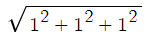
which is just sqrt(3).
If you want to cut off this maximum distance to find similar colors, multiplying it by a 0-1 constant (the threshold) will ensure that the cutoff occurs within the maximum distance between colors.
---
### Author:  [@doni](https://discourse.processing.org/u/doni)
#### Post date: [July 4, 2021, 11:06am UTC](https://discourse.processing.org/t/realtime-image-processing-using-thread-or-class-extending-thread/30304/39 "2021-07-04T11:06:30Z")
hi brother ! if you don’t mind would you like to help me how to check if there is target color between range of x = 500 - width and y = 320 - height. thank you
---
### Author:  [@doni](https://discourse.processing.org/u/doni)
#### Post date: [October 20, 2022, 1:27pm UTC](https://discourse.processing.org/t/realtime-image-processing-using-thread-or-class-extending-thread/30304/40 "2022-10-20T13:27:32Z")
hi again @Shwaa would you like to help me again on this for loop part
```auto
for(int i = 0; i < posBuffer.pixels.length; i++){
// encoded so blue is > 0 if a pixel is within threshold
if(blue(posBuffer.pixels[i]) > 0){
count++;
// processing takes 0-1 (float) color values from shader to 0-255 (int) values for color
// to decode, we need to divide the color by 255 to get the original value
avg.add(red(posBuffer.pixels[i]) / 255.0, green(posBuffer.pixels[i]) / 255.0);
}
}
```
how i could change it to be come for loop as following
```auto
for (int x = 0; x < video.width && x < 100; x ++ ) {
for (int y = 240; y < video.height; y ++ )
```
since i want to limit the scanning/ tracking are of x and y axis. thank you in advance
---
### Author:  [@vkbr](https://discourse.processing.org/u/vkbr)
#### Post date: [October 21, 2022, 1:01am UTC](https://discourse.processing.org/t/realtime-image-processing-using-thread-or-class-extending-thread/30304/41 "2022-10-21T01:01:30Z")
I added an answer in the other thread about this particular point of traversing 1d or 2d arrays and cosntraining it to an area:
[How to iterate video.pixels.length for random area of image - #24 by vkbr](https://discourse.processing.org/t/how-to-iterate-video-pixels-length-for-random-area-of-image/39367/24)
[Previous page](https://discourse.processing.org/t/realtime-image-processing-using-thread-or-class-extending-thread/30304.md?page=1)