(PShapeOBJ.java:27)
at processing.opengl.PGraphics3D.loadShapeImpl(PGraphics3D.java:128)
at processing.opengl.PGraphicsOpenGL.loadShape(PGraphicsOpenGL.java:3382)
at processing.core.PApplet.loadShape(PApplet.java:11254)
at simulation.setup(simulation.java:30)
at processing.core.PApplet.handleDraw(PApplet.java:2142)
at processing.opengl.PSurfaceJOGL$DrawListener.display(PSurfaceJOGL.java:825)
at jogamp.opengl.GLDrawableHelper.displayImpl(GLDrawableHelper.java:692)
at jogamp.opengl.GLDrawableHelper.display(GLDrawableHelper.java:674)
at jogamp.opengl.GLAutoDrawableBase$2.run(GLAutoDrawableBase.java:443)
at jogamp.opengl.GLDrawableHelper.invokeGLImpl(GLDrawableHelper.java:1293)
at jogamp.opengl.GLDrawableHelper.invokeGL(GLDrawableHelper.java:1147)
at com.jogamp.newt.opengl.GLWindow.display(GLWindow.java:782)
at com.jogamp.opengl.util.AWTAnimatorImpl.display(AWTAnimatorImpl.java:81)
at com.jogamp.opengl.util.AnimatorBase.display(AnimatorBase.java:453)
at com.jogamp.opengl.util.FPSAnimator$MainTask.run(FPSAnimator.java:178)
at java.base/java.util.TimerThread.mainLoop(Timer.java:566)
at java.base/java.util.TimerThread.run(Timer.java:516)
```
---
### Author:  [@svan](https://discourse.processing.org/u/svan)
#### Post date: [June 28, 2022, 3:21pm UTC](https://discourse.processing.org/t/loadshape-cannot-find-obj-file-in-data-folder/37745/2 "2022-06-28T15:21:14Z")
Error message says “reader” is null. Have you tried adding ‘import [java.io](http://java.io).\*’ at the top? Is it possible to post the url for the object so that others can test your code?
Does your data folder contain at least 3 files: .obj, .mtl, .png (or texture equivalent). See Examples/Shape/LoadDisplayOBJ.
---
### Author:  [@miiguell](https://discourse.processing.org/u/miiguell)
#### Post date: [June 28, 2022, 6:19pm UTC](https://discourse.processing.org/t/loadshape-cannot-find-obj-file-in-data-folder/37745/3 "2022-06-28T18:19:12Z")
Hi Svan,
thank you for the response! This is the link to the place where I downloaded the .obj file from. I tried adding `import java.io.*;` at the top but the problem still exists
[https://sketchfab.com/3d-models/space-shuttle-ff4b00b7ebb24fdd98fb96b08f2c43c9](https://sketchfab.com/3d-models/space-shuttle-ff4b00b7ebb24fdd98fb96b08f2c43c9)
---
### Author:  [@svan](https://discourse.processing.org/u/svan)
#### Post date: [June 28, 2022, 7:20pm UTC](https://discourse.processing.org/t/loadshape-cannot-find-obj-file-in-data-folder/37745/4 "2022-06-28T19:20:51Z")
Thank you for the URL. The following ‘sort of’ works on my Mac. You should see a shuttle image rotating in the window. The .mtl file is missing from the original download. Attached you can also see the files that I used. The main file should have only one .obj extension, not two as was included in the download.
```auto
PShape rocket;
float ry;
void setup() {
size(500, 500, P3D);
rocket = loadShape("space-shuttle.obj");
}
void draw() {
background(200);
lights();
translate(width/2, height/2, 300);
rotateZ(PI);
rotateY(ry);
shape(rocket);
ry += 0.02;
}
```
**Files in ‘data’ folder. add missing .mtl file (see below).**

---
### Author:  [@svan](https://discourse.processing.org/u/svan)
#### Post date: [June 28, 2022, 7:52pm UTC](https://discourse.processing.org/t/loadshape-cannot-find-obj-file-in-data-folder/37745/5 "2022-06-28T19:52:14Z")
Try adding the following file entitled ‘space-shuttle.mtl’ to the data folder:
```auto
newmtl Default
illum 2
Ns 96.078431
Ka 0.000000 0.000000 0.000000
Kd 0.533333 0.533333 0.533333
Ks 0.100000 0.100000 0.100000
Ni 1.000000
d 1.000000
map_Kd ShuttleDiffuseMap.jpg
```
---
### Author:  [@miiguell](https://discourse.processing.org/u/miiguell)
#### Post date: [June 28, 2022, 8:24pm UTC](https://discourse.processing.org/t/loadshape-cannot-find-obj-file-in-data-folder/37745/6 "2022-06-28T20:24:36Z")
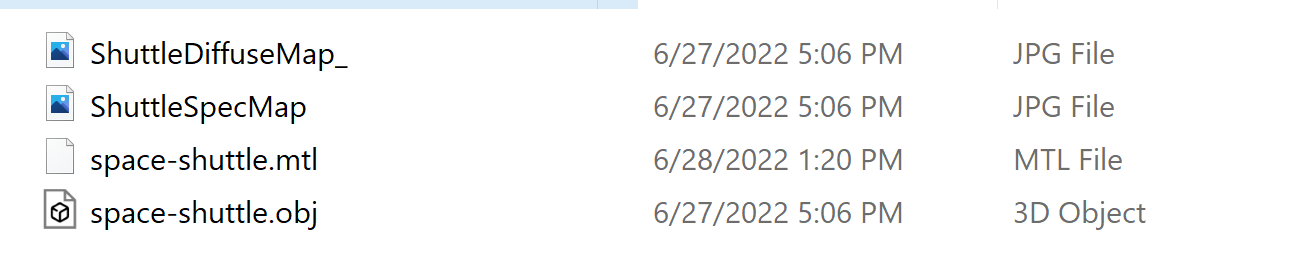
No luck for me unfortunately. I created the file you suggested as well and still get the same error. I’m placing images of the files in the data folder that is next to the sketch.
---
### Author:  [@svan](https://discourse.processing.org/u/svan)
#### Post date: [June 28, 2022, 9:15pm UTC](https://discourse.processing.org/t/loadshape-cannot-find-obj-file-in-data-folder/37745/7 "2022-06-28T21:15:45Z")
‘data’ folder has to be inside of sketch folder. Get rid of that trailing underscore on ShuttleDiffuseMap; computers are finicky and text has to be exact. Works on a Mac.

**Sketch folder:**

---
### Author:  [@miiguell](https://discourse.processing.org/u/miiguell)
#### Post date: [June 28, 2022, 10:11pm UTC](https://discourse.processing.org/t/loadshape-cannot-find-obj-file-in-data-folder/37745/8 "2022-06-28T22:11:59Z")
Interesting. Still nothing. What’s funny is that I found another space shuttle .OBJ file and that worked just fine for some reason but this original one still doesn’t want to open. I have my data folder inside the sketch folder the same way you do and inside I have the 4 files (2 JPG, .mtl, and .obj). I might keep the new one that I found but it still bothers me that this specific model doesn’t open at all
---
### Author:  [@svan](https://discourse.processing.org/u/svan)
#### Post date: [June 28, 2022, 11:02pm UTC](https://discourse.processing.org/t/loadshape-cannot-find-obj-file-in-data-folder/37745/9 "2022-06-28T23:02:31Z")
I presume that you are using Windows operating system. There are lots of users here who are also Windows users and perhaps they can also run the demo to see if they have a problem.
---
### Author:  [@miiguell](https://discourse.processing.org/u/miiguell)
#### Post date: [June 29, 2022, 5:51am UTC](https://discourse.processing.org/t/loadshape-cannot-find-obj-file-in-data-folder/37745/10 "2022-06-29T05:51:34Z")
I downloaded the files yout posted ont he drop box and it works perfectly! I wonder if one of the files was corrupted somehow on my system. Thank you for the help!
---
### Author:  [@asymmetric](https://discourse.processing.org/u/asymmetric)
#### Post date: [December 25, 2022, 7:00pm UTC](https://discourse.processing.org/t/loadshape-cannot-find-obj-file-in-data-folder/37745/11 "2022-12-25T19:00:02Z")
Hi, I’m having the same issue with a Mac OS. What am I doing wrong? How do I run the demo mode? I exported a model from thingiverse but it is only appearing black within the processing.js window.