# Help Test SVG Export for p5.js (GSoC 2026)
**URL:** https://discourse.processing.org/t/help-test-svg-export-for-p5-js-gsoc-2026/48850
**Category:** Libraries
**Tags:** contributions, dev-update
**Created:** [June 23, 2026, 6:13am UTC](https://discourse.processing.org/t/help-test-svg-export-for-p5-js-gsoc-2026/48850 "2026-06-23T06:13:28Z")
**Posts on this page:** 7
**Page:** 1
### Author:  [@VANSH3104](https://discourse.processing.org/u/VANSH3104)
#### Post date: [June 23, 2026, 6:13am UTC](https://discourse.processing.org/t/help-test-svg-export-for-p5-js-gsoc-2026/48850/1 "2026-06-23T06:13:28Z")
# Looking for Feedback on SVG Export for p5.js
Hi everyone,
As part of Google Summer of Code 2026 with p5.js, I’ve been working on an addon that adds SVG export and import support using the Shape system.
Version 1 of the SVG export functionality is now complete, and I’d love to get some feedback from people outside the project before moving further into import support and API design.
If you’d like to try it out:
- GitHub: [GitHub - VANSH3104/p5.SVG.js at flat · GitHub](https://github.com/VANSH3104/p5.SVG.js/tree/flat)
- p5 Editor example: [SVG-Export by vanshkabra05 -p5.js Web Editor](https://editor.p5js.org/vanshkabra05/sketches/45caLrfVy)
I’m especially interested in hearing about things like:
- Was it easy to get started?
- Did the API feel natural to use?
- Did the exported SVG match what you expected?
- Were there any bugs, confusing behaviors, or missing features?
- Is there anything you’d want before using something like this in your own sketches?
If possible, try exporting one of your own sketches rather than just the example sketch. Real-world examples are especially helpful because they often reveal edge cases we haven’t thought about yet.
Feel free to reply with comments, suggestions, issues you run into, or even sketches you’ve made with it.
Thanks to anyone who takes the time to try it out. Any feedback, whether it’s a bug report, a feature request, or just a quick impression, is greatly appreciated.
---
### Author:  [@sableraph](https://discourse.processing.org/u/sableraph)
#### Post date: [June 23, 2026, 10:29am UTC](https://discourse.processing.org/t/help-test-svg-export-for-p5-js-gsoc-2026/48850/2 "2026-06-23T10:29:26Z")
Hey @VANSH3104, thanks for your work!
I tried opening the SVG saved by the sketch example you shared in both Inkscape and Illustrator and the shapes are there but everything appears as fully black:
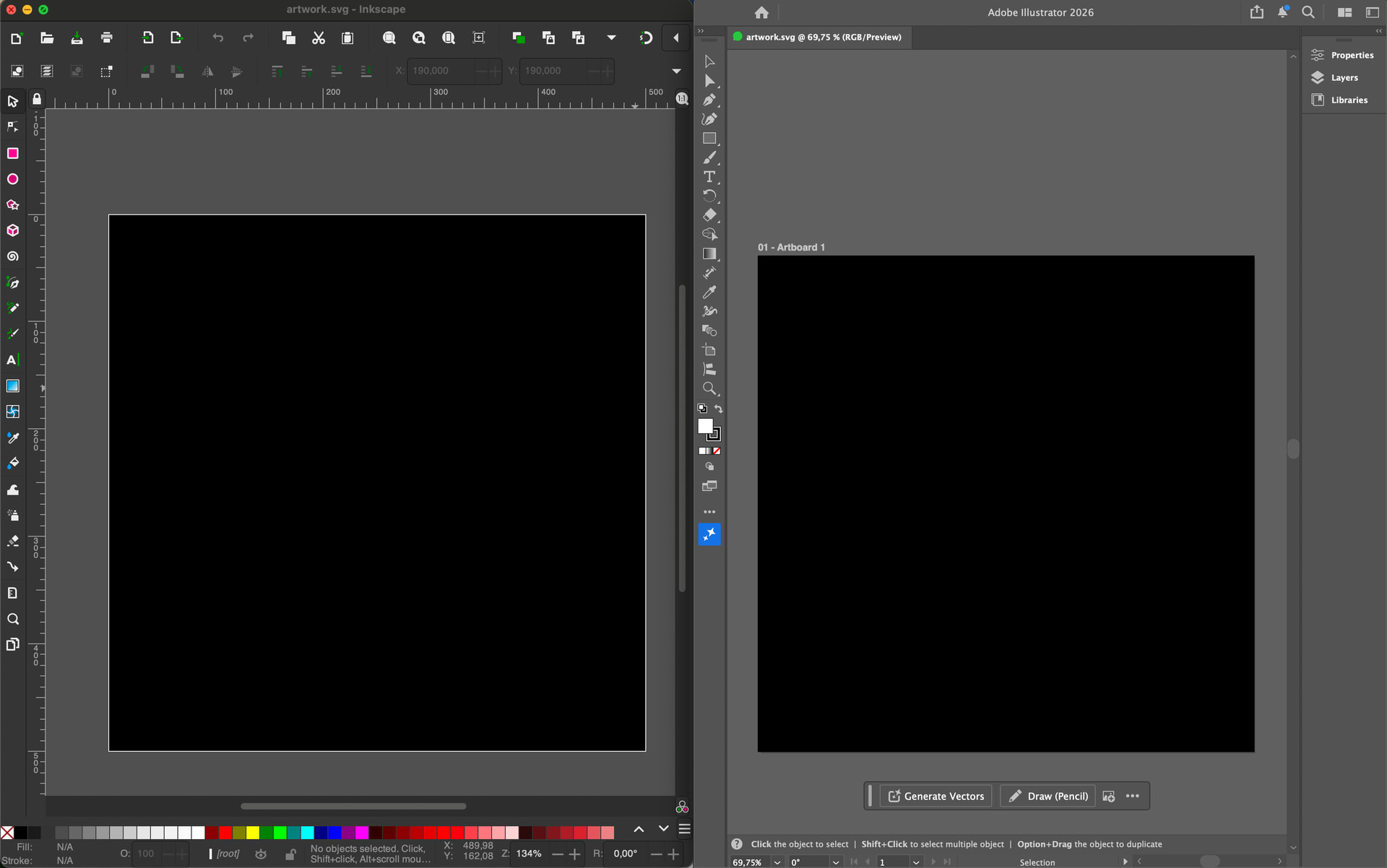
This is what I get when just showing the outlines of shapes:

---
### Author:  [@VANSH3104](https://discourse.processing.org/u/VANSH3104)
#### Post date: [June 23, 2026, 10:53am UTC](https://discourse.processing.org/t/help-test-svg-export-for-p5-js-gsoc-2026/48850/3 "2026-06-23T10:53:51Z")
Thanks for testing and sharing the screenshots!
I’ve identified and fixed the issue. It was caused by incorrect handling of some color opacity values during SVG export, which affected fills and strokes in applications like Inkscape and Illustrator.
The fix is now in place. Thanks again for reporting and helping test it!
---
### Author:  [@kit](https://discourse.processing.org/u/kit)
#### Post date: [June 26, 2026, 10:34am UTC](https://discourse.processing.org/t/help-test-svg-export-for-p5-js-gsoc-2026/48850/4 "2026-06-26T10:34:36Z")
Hi @VANSH3104 ! I tried the updated example, it seems to skip the `rect`? I opened in Inskscape ✅ and the circles are there, but rect is not at all (also not behind anything)
Very exciting work!
---
### Author:  [@kit](https://discourse.processing.org/u/kit)
#### Post date: [June 26, 2026, 11:56am UTC](https://discourse.processing.org/t/help-test-svg-export-for-p5-js-gsoc-2026/48850/5 "2026-06-26T11:56:58Z")
(Ah seems like maybe you fixed it? If you _didn’t_ fix it then maybe something is flaky because your original code works for me now with `rect`.) Anyway, some more notes from experimentation below, I had fun, thanks for working on this!
As expected multiple shapes can be drawn and exported, and usage with draw loop works. My main use case for svg export is to be able to build multiple figures based on a linedrawing+noise/randomness. If that’s useful/interesting to use as a basis for a test example, I’ve pasted code and example outputs below.
Minor: `artwork1 = buildShape();` produces a very mysterious error: `TypeError: t is not a function`
```js
//noprotect
let figure1;
let figure2;
let figure3;
let points;
let MAX_POINTS = 800;
function setup() {
createCanvas(1000, 500);
pixelDensity(1);
points = [];
while (points.length{
beginShape();
for (let i=0; i{
for (let i=0; i MAX_POINTS) points.shift();
circle(mouseX, mouseY, 20)
}
noFill();
strokeWeight(10);
stroke("#fffdb8")
figure1 = buildShape(figure(0));
strokeWeight(1);
stroke("#00fadd")
figure3 = buildShape(hair(20));
strokeWeight(5);
stroke("#e62858")
figure2 = buildShape(figure(5));
}
function keyPressed() {
if (key === "s" || key === "S") {
saveSVG(figure1, "fig.svg");
saveSVG(figure2, "fig.svg");
saveSVG(figure3, "fig.svg");
}
save("all.png")
}
```


Lastly, it is possible to have some cool color effects outside of buildShape (`blendMode` - not in the example below but I experimented with it).
```js
let artwork1;
let artwork2;
function setup() {
createCanvas(500, 500);
}
function draw() {
blendMode(BLEND);
background("#f8f9fa");
blendMode(DIFFERENCE)
artwork1 = buildShape(() => {
push();
noStroke();
translate(width / 2, height / 2);
fill("#f94144");
circle(0, 0, 120);
fill("#f3722c");
rotate(PI / 4);
rect(-40, -40, 80, 80);
pop();
fill("#f9c74f");
circle(mouseX, mouseY, 40);
});
artwork2 = buildShape(() => {
translate(10,10);
fill("#4ef9af");
circle(mouseX, mouseY, 40);
});
}
function keyPressed() {
if (key === "s" || key === "S") {
saveSVG(artwork1, "artwork.svg");
saveSVG(artwork2, "artwork.svg");
}
}
```
---
### Author:  [@VANSH3104](https://discourse.processing.org/u/VANSH3104)
#### Post date: [June 26, 2026, 1:09pm UTC](https://discourse.processing.org/t/help-test-svg-export-for-p5-js-gsoc-2026/48850/6 "2026-06-26T13:09:54Z")
Thanks so much for testing all of this!
The `rect` is actually working on my end, and I didn’t change anything after the first report, so it might have just been something flaky. I’ll definitely keep an eye on it though.
Also, thanks for catching the `TypeError: t is not a function` issue : **that’s fixed now.**
And thanks for sharing your workflow! I had tested similar scenarios before, but your example is a much better stress test since it exercises multiple shapes, `draw()`, and procedural generation all together. I think it’d make a really nice example too, btw if that output supposed to be a horse, it looks really cool. 😄
Regarding the blend mode experiments, that’s a neat observation! I like that `buildShape()` can fit into the normal p5 rendering workflow, so you can still use things like `blendMode()` outside of it while creating the artwork.
---
### Author:  [@kit](https://discourse.processing.org/u/kit)
#### Post date: [June 26, 2026, 1:29pm UTC](https://discourse.processing.org/t/help-test-svg-export-for-p5-js-gsoc-2026/48850/7 "2026-06-26T13:29:56Z")
Yes, it is a horse! Unfortunately I sketched it based on a postcard near my desk, so it is [unqualified for Dave’s horse project](https://davepagurek.github.io/horse-drawings/) 🐎💅