# Google Maps Will Not Accept My .csv File
**URL:** https://discourse.processing.org/t/google-maps-will-not-accept-my-csv-file/47237
**Category:** Coding Questions
**Created:** [September 27, 2025, 11:09pm UTC](https://discourse.processing.org/t/google-maps-will-not-accept-my-csv-file/47237 "2025-09-27T23:09:29Z")
**Posts on this page:** 6
**Page:** 1
### Author:  [@fredstout](https://discourse.processing.org/u/fredstout)
#### Post date: [September 27, 2025, 11:09pm UTC](https://discourse.processing.org/t/google-maps-will-not-accept-my-csv-file/47237/1 "2025-09-27T23:09:29Z")
Google Maps expects a .csv file containing data to place on a map. My test file has 5 rows and 5 columns. The first row is a header with column names. My file ends with the usual null characters. It failed to load. I added a \r\n to the end, it still failed. I added \n to the end of the last line, it still failed to load. I surrounded all the data with double quotes and it still failed. However, if I remove the extra stuff , load it into Excell, and then save it as a .csv file, it works.
What am I missing here? Why does the Excell .csv file work?
---
### Author:  [@glv](https://discourse.processing.org/u/glv)
#### Post date: [September 28, 2025, 3:46pm UTC](https://discourse.processing.org/t/google-maps-will-not-accept-my-csv-file/47237/2 "2025-09-28T15:46:01Z")
Hello @fredstout ,
Notepad++ is a good tool for examining files.
I often use it to examine text files that may have some characters that are hidden and unwanted.
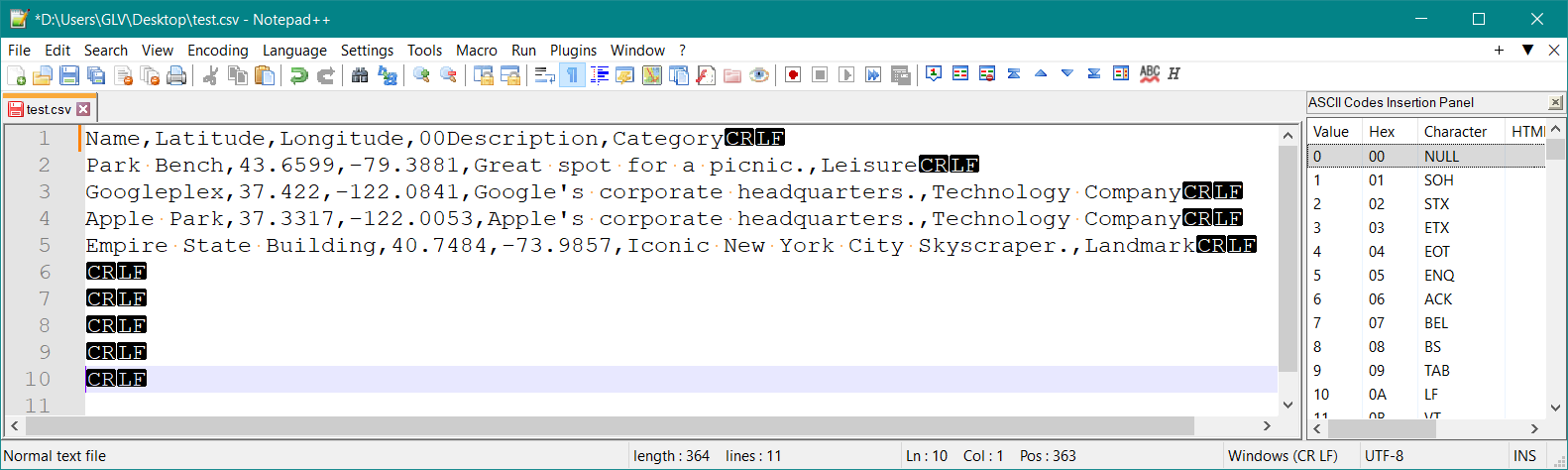
I suggest you compare (add a _compare plugin_) your two files to see what the issue was with the original file.
I only had CR LF in above and added the extras to the end.
I tried UTF-8 (recommended) and also UTF-16 and both worked!
You can also add characters from the character panel for testing (Panel on right in image).
> [@fredstout](#):
>
> My file ends with the usual null characters. It failed to load.
You should not have null characters in your CSV; this is just _plain text_ and should only have printable characters (no nulls or non printable ones).
Sample text:
```plaintext
Name,Latitude,Longitude,00Description,Category
Park Bench,43.6599,-79.3881,Great spot for a picnic.,Leisure
Googleplex,37.422,-122.0841,Google's corporate headquarters.,Technology Company
Apple Park,37.3317,-122.0053,Apple's corporate headquarters.,Technology Company
Empire State Building,40.7484,-73.9857,Iconic New York City Skyscraper.,Landmark
```
There is a learning curve to using _NotePad++_ but worth the investment in time.
This is one the the essential tools in my tool box:
> **[Downloads | Notepad++](https://notepad-plus-plus.org/downloads/)**
I was able to successfully create CSV files for Google Maps and import these.
That was fun!
`:)`
---
### Author:  [@glv](https://discourse.processing.org/u/glv)
#### Post date: [September 28, 2025, 6:26pm UTC](https://discourse.processing.org/t/google-maps-will-not-accept-my-csv-file/47237/5 "2025-09-28T18:26:48Z")
> [@fredstout](#):
>
> I think that you added the CFLF at the end of each line (?) and as the first characters of the line after the data. Is this correct?
That is what was hidden and revealed with Notepad++:

I add a CRLF at end of text for testing.
> [@fredstout](#):
>
> BTW, what version of Notepad ++ do you suggest?
I use the latest.
There is a learning curve to using Notepad++ !
I have been using it for decades and it is now just a tool.
I wanted to see if Processing generates the correct CSV as part of testing:
```auto
Table table;
void setup() {
table = new Table();
// Name Latitude Longitude Description Category
table.addColumn("Name", Table.STRING);
table.addColumn("Latitude", Table.FLOAT);
table.addColumn("Longitude", Table.FLOAT);
table.addColumn("Description", Table.STRING);
table.addColumn("Category", Table.STRING);
// Googleplex 37.422 -122.0841 Google's corporate headquarters. Technology Company
TableRow newRow = table.addRow();
table.setString(0, "Name", "Googleplex");
table.setFloat(0, "Latitude", 37.422);
table.setFloat(0, "Longitude", -122.0841);
table.setString(0, "Description", "Google's corporate headquarters.");
table.setString(0, "Category", "Technology Company");
saveTable(table, "data/new.csv");
}
```
It looked ok!
`:)`
---
### Author:  [@glv](https://discourse.processing.org/u/glv)
#### Post date: [September 29, 2025, 12:00am UTC](https://discourse.processing.org/t/google-maps-will-not-accept-my-csv-file/47237/8 "2025-09-29T00:00:50Z")
> [@fredstout](#):
>
> I made it work by creating a file that was exactly as long as it needed to be to hold the data. It seems as though the null characters at the end cause MyMaps to become upset.
How are you currently creating these files?
If it is Processing code please share a minimal example.
`:)`
---
### Author:  [@svan](https://discourse.processing.org/u/svan)
#### Post date: [September 30, 2025, 6:15pm UTC](https://discourse.processing.org/t/google-maps-will-not-accept-my-csv-file/47237/16 "2025-09-30T18:15:31Z")
> [@fredstout](#):
>
> two rows of tick marks
Those are grave accents; on my mac keyboard the key is top left, immediately before the “1“
> **[Grave accent](https://en.wikipedia.org/wiki/Grave_accent)**
>
> The grave accent (\`, ◌̀) (/ɡreɪv/ GRAYV or /ɡrɑːv/ GRAHV) is a diacritical mark used to varying degrees in French, Dutch, Portuguese, Italian, Catalan and many other Western European languages as well as for a few unusual uses in English. It is also used in other languages using the Latin alphabet, such as Mohawk and Yoruba, and with non-Latin writing systems such as the Greek and Cyrillic alphabets and the Bopomofo or Zhuyin Fuhao semi-syllabary. It has no single meaning, but can in For the m...
Use ````Processing … ```` if you want it formatted for Processing (its possible to format for other languages such as Python as well).
---
### Author:  [@fredstout](https://discourse.processing.org/u/fredstout)
#### Post date: [October 1, 2025, 1:41pm UTC](https://discourse.processing.org/t/google-maps-will-not-accept-my-csv-file/47237/17 "2025-10-01T13:41:44Z")
```auto
void MyMaps (int count){
String Title = "Station,Latitude,Longitude,Name";
String w = "";
int i;
int records = count -1;
MyMapsData = new String [count - 2];
MyMapsPointer = 1;
MyMapsData[0] = Title;
for (i = 2; i < records; i++){
Tokens = Mapping_Data[i].split(",");
if (Tokens[0].equals(" ***EOF***")) break;
if (Tokens[1].equals("MMX")) Tokens[7] = "New MM "+str(int(Tokens[7])) + ".0";
w = Tokens[0] + "," + Tokens[3] + "," + Tokens[4] + "," + Tokens[7];
MyMapsData[MyMapsPointer] = w;
MyMapsPointer ++;
}
saveStrings (MyMapsDataFileName,MyMapsData );
}
```
Did I get the formatting and tick marks correct?
My thanks, again, for your help.
Fred