# Digitize Audio Input
**URL:** https://discourse.processing.org/t/digitize-audio-input/13156
**Category:** Libraries
**Created:** [August 3, 2019, 5:04pm UTC](https://discourse.processing.org/t/digitize-audio-input/13156 "2019-08-03T17:04:56Z")
**Posts on this page:** 9
**Page:** 1
### Author:  [@StevenSarns](https://discourse.processing.org/u/StevenSarns)
#### Post date: [August 3, 2019, 5:04pm UTC](https://discourse.processing.org/t/digitize-audio-input/13156/1 "2019-08-03T17:04:56Z")
Hello All, Thanks in advance for any insights. I am very new to Processing. My project is to create an oscilloscope-like presentation of the signal on the MIC input of my desktop computer. The test waveform is a 20 Hz sawtooth wave generated by an external signal generator.
1 - the externally generated signal is being acquired correctly by the PC audio hardware as evidenced by a correct display using the example code in the minim getLineIn [example](http://code.compartmental.net/minim/audioinput_class_audioinput.html).
2- my code generates the desired display when executed using the “test();” fake input generator function.
3 - when the “test()” call is commented out, I get an unintelligible image (see below)

I suspect that using a buffer size of 1 is the root of my problem (minim might normalize the data).
? - is there a simpler way to get a digitized sample of the MIC in?
? - am I missing something about the way getLineIn works?
```auto
import ddf.minim.*;
Minim minim;
AudioInput in;
void setup()
{
size(1000, 200);
minim = new Minim(this);
in = minim.getLineIn(Minim.MONO,1); // getLineIn(int type, int bufferSize, float sampleRate)
background(0);
stroke(255);
frameRate(1000); // draw()/sec
}
int x;
int lastX=0;
float y;
float lastY=0;
void draw()
{
x++;
if(x>width) {
x=0;
lastX=0;
background(0);
stroke(255);
}
y = in.left.get(0);
test();
line(lastX,100+(lastY*100),x,100+(y*100));
lastY=y;
lastX=x;
}
void test() {
float xx = x%50;
y = xx/50 - .5;
}
```
---
### Author:  [@glv](https://discourse.processing.org/u/glv)
#### Post date: [August 3, 2019, 7:58pm UTC](https://discourse.processing.org/t/digitize-audio-input/13156/2 "2019-08-03T19:58:42Z")
Please format your code when posting.
Try to cut and paste your current code into Processing and you will see why.
---
### Author:  [@glv](https://discourse.processing.org/u/glv)
#### Post date: [August 3, 2019, 8:09pm UTC](https://discourse.processing.org/t/digitize-audio-input/13156/3 "2019-08-03T20:09:49Z")
When you “cut and paste” this from Processing (formatted code):
`line(lastX,100+(lastY*100),x,100+(y*100));`
This is what we see (unformatted code):
line(lastX,100+(lastY_100),x,100+(y_100));
Just highlight your code and click on the \ button in the editor.
🙂
---
### Author:  [@StevenSarns](https://discourse.processing.org/u/StevenSarns)
#### Post date: [August 3, 2019, 8:26pm UTC](https://discourse.processing.org/t/digitize-audio-input/13156/4 "2019-08-03T20:26:14Z")
Thanks - I wondered how to do that.
```auto
import ddf.minim.*;
Minim minim;
AudioInput in;
void setup()
{
size(1000, 200);
minim = new Minim(this);
in = minim.getLineIn(Minim.MONO,1); // getLineIn(int type, int bufferSize, float sampleRate)
background(0);
stroke(255);
frameRate(1000); // draw()/sec
}
int x;
int lastX=0;
float y;
float lastY=0;
void draw()
{
x++;
if(x>width) {
x=0;
lastX=0;
background(0);
stroke(255);
}
y = in.left.get(0);
// test();
line(lastX,100+(lastY*100),x,100+(y*100));
lastY=y;
lastX=x;
}
void test() {
float xx = x%50;
y = xx/50 - .5;
}
```
---
### Author:  [@glv](https://discourse.processing.org/u/glv)
#### Post date: [August 3, 2019, 8:51pm UTC](https://discourse.processing.org/t/digitize-audio-input/13156/5 "2019-08-03T20:51:50Z")
Look at the “examples” that come with the minim library.

🙂
---
### Author:  [@StevenSarns](https://discourse.processing.org/u/StevenSarns)
#### Post date: [August 3, 2019, 9:11pm UTC](https://discourse.processing.org/t/digitize-audio-input/13156/6 "2019-08-03T21:11:59Z")
Thanks, but…
The example you suggested fills a buffer, then plays the buffer. I am trying to get a single data point (buffer size of one) and plot that point. I am looking for a solution to the problem of acquiring a single data point.
---
### Author:  [@jeremydouglass](https://discourse.processing.org/u/jeremydouglass)
#### Post date: [August 7, 2019, 3:42am UTC](https://discourse.processing.org/t/digitize-audio-input/13156/7 "2019-08-07T03:42:18Z")
Possibly relevant: an example of a minim oscilloscope.
> **[Processing 2.x and 3.x Forum](https://forum.processing.org/two/discussion/1129/simple-oscilloscope)**
>
> Processing is an electronic sketchbook, a language and a worldwide community. This is its forum.
---
### Author:  [@kll](https://discourse.processing.org/u/kll)
#### Post date: [August 23, 2019, 2:58am UTC](https://discourse.processing.org/t/digitize-audio-input/13156/8 "2019-08-23T02:58:43Z")
hi, @StevenSarns,
how is your project
- signal generator ( with 20Hz sawtooth sound output? )
- microphone PC sound card
- record to file? or looped to processing input
- scope like processing show
* * *
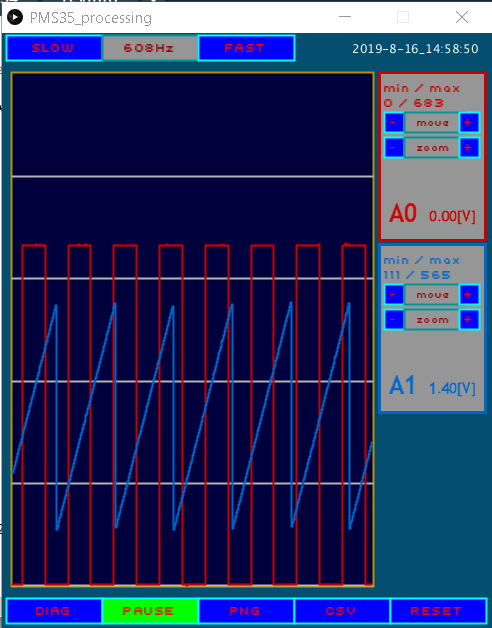
i am currently on a remake of a processing scope
using arduino USB connected analog inputs.
but think that sound frequencies are on the limit of that hardware.
as i lack the hardware ( calibrated signal generator ) even to see that my indicated
frequencies are nearly correct, i think after reading this post , that using a
sound / micro / arduino analog input /
might be a good idea and not need to buy much signal generation hardware,
just play a sound from any PC using ?audacity?

* * *
up to now i only have a signal from a other arduino ( DUE has analog output )
where i have no idea what frequency that might be
( can not calibrate one arduino with an other )
* * *
but i hope i get the mic input to a arduino working.
but yes, that is total different as your PC soundcard with micro / processing / minim lib / way.
---
### Author:  [@glv](https://discourse.processing.org/u/glv)
#### Post date: [August 23, 2019, 10:46am UTC](https://discourse.processing.org/t/digitize-audio-input/13156/9 "2019-08-23T10:46:12Z")
Simple online tone generator for audio range:
[https://www.szynalski.com/tone-generator/](https://www.szynalski.com/tone-generator/)
🙂