# Creating a Vector-Based "Texture" and filling a shape
**URL:** https://discourse.processing.org/t/creating-a-vector-based-texture-and-filling-a-shape/45911
**Category:** Coding Questions
**Created:** [March 5, 2025, 4:15pm UTC](https://discourse.processing.org/t/creating-a-vector-based-texture-and-filling-a-shape/45911 "2025-03-05T16:15:51Z")
**Posts on this page:** 8
**Page:** 1
### Author:  [@revived](https://discourse.processing.org/u/revived)
#### Post date: [March 5, 2025, 4:15pm UTC](https://discourse.processing.org/t/creating-a-vector-based-texture-and-filling-a-shape/45911/1 "2025-03-05T16:15:51Z")
Hi all -
I’d like to create an SVG file of an arbitrarily-sided polygon that is filled with triangles (or other drawings, potentially.).
I have no idea how to do this in Processing or if it is even possible.
I was hoping someone here might be able to help me. I’ve provided the basic example I’m working with, which draws a shape and the intended texture - but I have no idea how to join them. Any help would be greatly, greatly appreciated.
Thanks!
```auto
import processing.svg.*;
void setup(){
size(500, 500);
noLoop();
}
void draw(){
beginRecord(SVG, "example.svg");
polygon(200, 200, random(100)+100, int(random(10)+4));
texturer();
endRecord();
}
void polygon(float x, float y, float radius, int npoints) {
float angle = TWO_PI / npoints;
noFill();
beginShape();
for (float a = 0; a < TWO_PI; a += angle) {
float sx = x + cos(a) * radius;
float sy = y + sin(a) * radius;
vertex(sx, sy);
}
endShape(CLOSE);
};
void texturer() {
for (int h=0; h<10; h++){
for (int v=0; v<10; v++){
push();
translate(h*10, v*10);
triangle(2, 8, 2, 2, 9, 4);
pop();
}
}
};
```
---
### Author:  [@quark](https://discourse.processing.org/u/quark)
#### Post date: [March 5, 2025, 5:30pm UTC](https://discourse.processing.org/t/creating-a-vector-based-texture-and-filling-a-shape/45911/2 "2025-03-05T17:30:01Z")
> [@revived](#):
>
> I have no idea how to do this in Processing or if it is even possible.
I don’t think it is possible because
1. to fill a shape you need to use a bitmap image as a texture
2. the SVG renderer does not support `texture(...)`, `textureMode(...)` etc. it needs the P2D or P3D renderers to use these statements.
I did have a play with this (code below) and the nearest I got was to display it on screen - I could not save it as a SVG (or PDF I tried that as well) 😄
So as far as I can see they can’t be linked together.
Final thought, SVG does support clipping to a non-rectangular region but I don’t think this is supported in Processing, the only reference I could find was [`clip()`](https://processing.org/reference/clip_.html)
```auto
import processing.svg.*;
import processing.pdf.*;
PGraphics tex;
void setup() {
size(500, 500, P2D);
tex = texturer();
noLoop();
}
void draw() {
background(240);
//beginRecord(SVG, "example.svg");
polygon(200, 200, random(100)+100, int(random(10)+4));
//endRecord();
}
void polygon(float x, float y, float radius, int npoints) {
float angle = TWO_PI / npoints;
beginShape();
stroke(255, 0, 0);
strokeWeight(3);
texture(tex);
textureMode(NORMAL);
for (float a = 0; a < TWO_PI; a += angle) {
float sx = x + cos(a) * radius;
float sy = y + sin(a) * radius;
vertex(sx, sy, (1 + cos(a)) / 2, (1 + sin(a)) / 2);
}
endShape(CLOSE);
}
PGraphics texturer() {
PGraphics pg = createGraphics(100, 100);
pg.beginDraw();
pg.background(255);
pg.stroke(0);
pg.strokeWeight(1.2);
pg.noFill();
for (int h=0; h<10; h++) {
for (int v=0; v<10; v++) {
pg.push();
pg.translate(h*10, v*10);
pg.triangle(2, 8, 2, 2, 9, 4);
pg.pop();
}
}
pg.endDraw();
return pg;
}
```
---
### Author:  [@svan](https://discourse.processing.org/u/svan)
#### Post date: [March 5, 2025, 6:30pm UTC](https://discourse.processing.org/t/creating-a-vector-based-texture-and-filling-a-shape/45911/3 "2025-03-05T18:30:18Z")
The following code examples will create a polygon with your triangle pattern. I’ll leave it to you to create an SVG from there; trying to create an SVG along with everything else causes the compiler to throw an exception. My approach would be to first create an image texture from your triangle pattern (I prefer the FX2D renderer for better resolution):
```auto
import processing.javafx.*;
import processing.svg.*;
void setup(){
size(1000, 1000, FX2D);
noLoop();
}
void draw(){
background(209);
noFill();
texturer();
}
void texturer() {
for (int h=0; h<100; h++){
for (int v=0; v<100; v++){
push();
translate(h*10, v*10);
triangle(2, 8, 2, 2, 9, 4);
pop();
}
}
};
void mousePressed() {
save("triangles.jpg");
println("image saved to sketch folder.");
}
```
After you have the image, then use it with your polygon code (note the four vertex parameters; using only two results in an error message):
```auto
PImage img;
void setup() {
size(600, 600, P2D);
img = loadImage("triangles.jpg");
noLoop();
}
void draw() {
background(209);
polygon(200, 200, random(100)+100, int(random(10)+4));
}
void polygon(float x, float y, float radius, int npoints) {
float angle = TWO_PI / npoints;
beginShape();
texture(img);
for (float a = 0; a < TWO_PI; a += angle) {
float sx = x + cos(a) * radius;
float sy = y + sin(a) * radius;
vertex(sx, sy, sx, sy);
}
endShape(CLOSE);
};
```
**Output:**

---
### Author:  [@revived](https://discourse.processing.org/u/revived)
#### Post date: [March 5, 2025, 6:37pm UTC](https://discourse.processing.org/t/creating-a-vector-based-texture-and-filling-a-shape/45911/4 "2025-03-05T18:37:02Z")
Wow - these examples both look great.
I do understand that Processing has a “texture()” function that requires bitmapped images - and I see that you both had really great, creative solutions for generated a bitmapped image out of the generated texture.
But if I specifically need to keep all this stuff vector-based, what are my options? I know it isn’t built-in to Processing, as it stands - but what would it take to find a workaround? Is it something Processing developers plan to do? Is it a reasonable request for a freelance assignment?
Thanks!
---
### Author:  [@svan](https://discourse.processing.org/u/svan)
#### Post date: [March 5, 2025, 6:42pm UTC](https://discourse.processing.org/t/creating-a-vector-based-texture-and-filling-a-shape/45911/5 "2025-03-05T18:42:34Z")
There are free online image to svg converters. Inkscape can also convert a .png image to .svg.
---
### Author:  [@quark](https://discourse.processing.org/u/quark)
#### Post date: [March 6, 2025, 2:52pm UTC](https://discourse.processing.org/t/creating-a-vector-based-texture-and-filling-a-shape/45911/6 "2025-03-06T14:52:55Z")
> [@revived](#):
>
> But if I specifically need to keep all this stuff vector-based
It is quite common to use bitmap images as textures and SVG supports embedded bitmaps and links to external bitmaps as part of its specification. SVG can also use vector graphics as textures but is more restrictive in capabilities compered to bitmaps. For instance Inkscape supports embedding and external links when saving SVG.
I have looked at how Processing implements SVG creation and it appears that when a `PGraphics` method (e.g. `line(...)` ) is executed it writes the SVG equivalent to a file. It means that many features in the SVG specification are inaccessible because there is no equivalent in `PGrahics`
So unfortunately there does not seem to be a simple work around.
---
### Author:  [@svan](https://discourse.processing.org/u/svan)
#### Post date: [March 7, 2025, 7:16am UTC](https://discourse.processing.org/t/creating-a-vector-based-texture-and-filling-a-shape/45911/7 "2025-03-07T07:16:08Z")
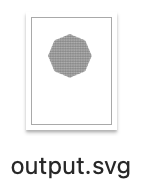
If we use a _mask_ to display the triangle texture inside of a polygon it is possible to create an .svg file. A two stage method is shown below. First the texture is created with a triangle pattern; it is important that this be 480x480 in size to avoid an array overrun in the minAlphas() function in the second step. The second step was taken from a Processing forum archive post and is the step which applies the mask and creates the .svg image.
**Step one; create the texture image for the mask:**
```auto
import processing.javafx.*;
import processing.svg.*;
void setup(){
size(480, 480, FX2D);
noLoop();
}
void draw(){
background(209);
noFill();
myTexture();
}
void myTexture() {
for (int h=0; h<48; h++){
for (int v=0; v<48; v++){
push();
translate(h*10, v*10);
triangle(2, 8, 2, 2, 9, 4);
pop();
}
}
};
void mousePressed() {
save("triangles.png");
println("image saved to sketch folder.");
}
```
**Step two; apply mask and create SVG:**
```auto
/**
* MaskAlphaImage
* 2019-12 Processing 3.4
* combine a tranparent image with mask alpha, and use both to mask the image
* https://discourse.processing.org/t/how-to-create-a-clipping-mask-that-preserves-transparency/16093/2
*/
// triangles.png must be 480x480 in size
import processing.svg.*;
PImage img;
PGraphics mask;
PShape s;
void polygon(float x, float y, float radius, int npoints) {
float angle = TWO_PI / npoints;
s.beginShape();
for (float a = 0; a < TWO_PI; a += angle) {
float sx = x + cos(a) * radius;
float sy = y + sin(a) * radius;
s.vertex(sx, sy);
}
s.endShape(CLOSE);
}
void setup() {
size(480, 480);
noLoop();
beginRecord(SVG, "output.svg");
s = createShape();
polygon(230, 230, 130, 8);
img = loadImage("triangles.png");
mask = createGraphics(480, 480);
mask.beginDraw();
mask.noStroke();
mask.shape(s);
mask.endDraw();
// apply existing alpha and mask --
img.mask(minAlphas(img, mask));
}
void draw() {
background(255, 255, 255);
image(img, 0, 0);
endRecord();
}
/**
* return a minimum alpha channel from two images --
* useful combining a transparent image with a second mask
* and passing it to mask()
*/
int[] minAlphas(PImage img, PImage img2) {
img.loadPixels();
img2.loadPixels();
int[] a = new int[img.pixels.length];
for (int i =0; i> 24 & 0xFF, img2.pixels[i] >> 24 & 0xFF);
}
return a;
}
```
**Output:**
---
### Author:  [@sableraph](https://discourse.processing.org/u/sableraph)
#### Post date: [March 7, 2025, 11:12am UTC](https://discourse.processing.org/t/creating-a-vector-based-texture-and-filling-a-shape/45911/8 "2025-03-07T11:12:35Z")
I haven’t tried it for SVG export, but [Geometry Suite for Processing (PGS)](https://github.com/micycle1/PGS) by @micycle has a mesh intersection feature which might do what you want, without the need for bitmap textures.
