# Color to grayscale algorithm
**URL:** https://discourse.processing.org/t/color-to-grayscale-algorithm/45171
**Category:** Processing.py
**Created:** [October 12, 2024, 8:30am UTC](https://discourse.processing.org/t/color-to-grayscale-algorithm/45171 "2024-10-12T08:30:24Z")
**Posts on this page:** 17
**Page:** 1
### Author:  [@paulstgeorge](https://discourse.processing.org/u/paulstgeorge)
#### Post date: [October 12, 2024, 8:30am UTC](https://discourse.processing.org/t/color-to-grayscale-algorithm/45171/1 "2024-10-12T08:30:24Z")
I want to convert RGB colour images to greyscale. I know a number of ways to do this in Processing, but the algorithms are under the bonnet. I want to do the conversion AND know what I am doing!
After some research ([Color-to-Grayscale: Does the Method Matter in Image Recognition?](https://journals.plos.org/plosone/article?id=10.1371/journal.pone.0029740)), I have found the method I want to use but I need help to do this in Processing. The method is called Gleam.
Here is what the author of the Color-to-Grayscale paper says:
Perhaps the simplest color to grayscale algorithm is Intensity. It is the mean of the RGB channels:

Although Intensity is calculated using linear channels, in practice gamma correction is often left intact when using datasets containing gamma corrected images. We call this method Gleam:

In terms of pixel values, Intensity and Gleam produce very different results.
When gamma corrected Intensity and Gleam are both applied to natural images, we found that Gleam produces pixel values around 20–25% smaller on average.
What is gamma correction and how would I implement the Glean color to grayscale algorithm in Processing?
---
### Author:  [@micycle](https://discourse.processing.org/u/micycle)
#### Post date: [October 12, 2024, 9:37am UTC](https://discourse.processing.org/t/color-to-grayscale-algorithm/45171/2 "2024-10-12T09:37:06Z")
RGB in Processing already is gamma-corrected, so simply taking average of the 3 RGB components gives the _Gleam_ metric.
If we linearly interpolate over a range of values in Processing (say black-to-white, 0-255), we get an even change in the **perceived** brightness of each colour: a black-to-white gradient with grey at the midpoint, even though the physical light intensity is non-linear. This is the expected behavior under gamma correction.
---
### Author:  [@paulstgeorge](https://discourse.processing.org/u/paulstgeorge)
#### Post date: [October 12, 2024, 1:26pm UTC](https://discourse.processing.org/t/color-to-grayscale-algorithm/45171/3 "2024-10-12T13:26:29Z")
Ah ha. Interesting. Thank you.
So, how would I implement the Intensity colour to grayscale algorithm in Processing? I want to compare the results…
---
### Author:  [@glv](https://discourse.processing.org/u/glv)
#### Post date: [October 12, 2024, 1:32pm UTC](https://discourse.processing.org/t/color-to-grayscale-algorithm/45171/4 "2024-10-12T13:32:54Z")
Hello @paulstgeorge,
Example from source code (give it a moment to go to line):
_[processing/core/src/processing/core/PImage.java at master · processing/processing · GitHub](https://github.com/processing/processing/blob/master/core/src/processing/core/PImage.java#L1025)_
You can implement your own custom image processing:
_[Images and Pixels / Processing.org](https://processing.org/tutorials/pixels)_
Bit manipulation is always faster:
_[& (bitwise AND) / Reference / Processing.org](https://processing.org/reference/bitwiseAND.html)_
_[red() / Reference / Processing.org](https://processing.org/reference/red_.html)_
Reference:
_[Gamma correction - Wikipedia](https://en.wikipedia.org/wiki/Gamma_correction)_
_[Grayscale - Wikipedia](https://en.wikipedia.org/wiki/Grayscale)_ \< Shows were the values come from in source code above.
[Luma (video) - Wikipedia](https://en.wikipedia.org/wiki/Luma_(video)) \< Used by Processing `filter(GRAY)`
`:)`
---
### Author:  [@solub](https://discourse.processing.org/u/solub)
#### Post date: [October 12, 2024, 4:50pm UTC](https://discourse.processing.org/t/color-to-grayscale-algorithm/45171/5 "2024-10-12T16:50:32Z")
The technical term you’re looking for is [Relative Luminance](https://en.wikipedia.org/wiki/Relative_luminance). It is a specific standard for calculating the brightness of colors as perceived by humans, with scientifically derived weights.
A rather well-illustrated Twitter/X [thread](https://x.com/timsoret/status/1251763478177644544) on the subject.
Although the Processing algorithm for grayscale conversion (using `filter(GRAY)`) is not an exact implementation of _relative luminance_, it’s conceptually similar and a close approximation for general use (only the weights differ slightly).
For comparison, here’s what the grayscale conversion function would look like if it used perceptual precision weightings.
```auto
def relative_luminance(img):
"""
Convert the image to grayscale using true relative luminance weights and bit shifting.
Reference -> https://en.wikipedia.org/wiki/Relative_luminance
"""
lum_img = createImage(img.width, img.height, RGB)
img.loadPixels()
lum_img.loadPixels()
for i in range(len(img.pixels)):
col = img.pixels[i]
# Extract RGB components using bit shifts
r = (col >> 16) & 0xff # Red component
g = (col >> 8) & 0xff # Green component
b = col & 0xff # Blue component
# Calculate the true relative luminance using scaled weights:
# Luminance = 0.2126 * Red + 0.7152 * Green + 0.0722 * Blue
# Approximation: 0.2126 * 256 = 54, 0.7152 * 256 = 183, 0.0722 * 256 = 18
lum = (54 * r + 183 * g + 18 * b) >> 8 # Bit-shift by 8 (dividing by 256)
# Set the grayscale pixel by combining the luminance value into RGB format
lum_img.pixels[i] = (col & 0xff000000) | (lum << 16) | (lum << 8) | lum
lum_img.updatePixels()
return lum_img
```

---
### Author:  [@paulstgeorge](https://discourse.processing.org/u/paulstgeorge)
#### Post date: [October 13, 2024, 11:15am UTC](https://discourse.processing.org/t/color-to-grayscale-algorithm/45171/6 "2024-10-13T11:15:27Z")
Thank you everyone! That was some good reading.
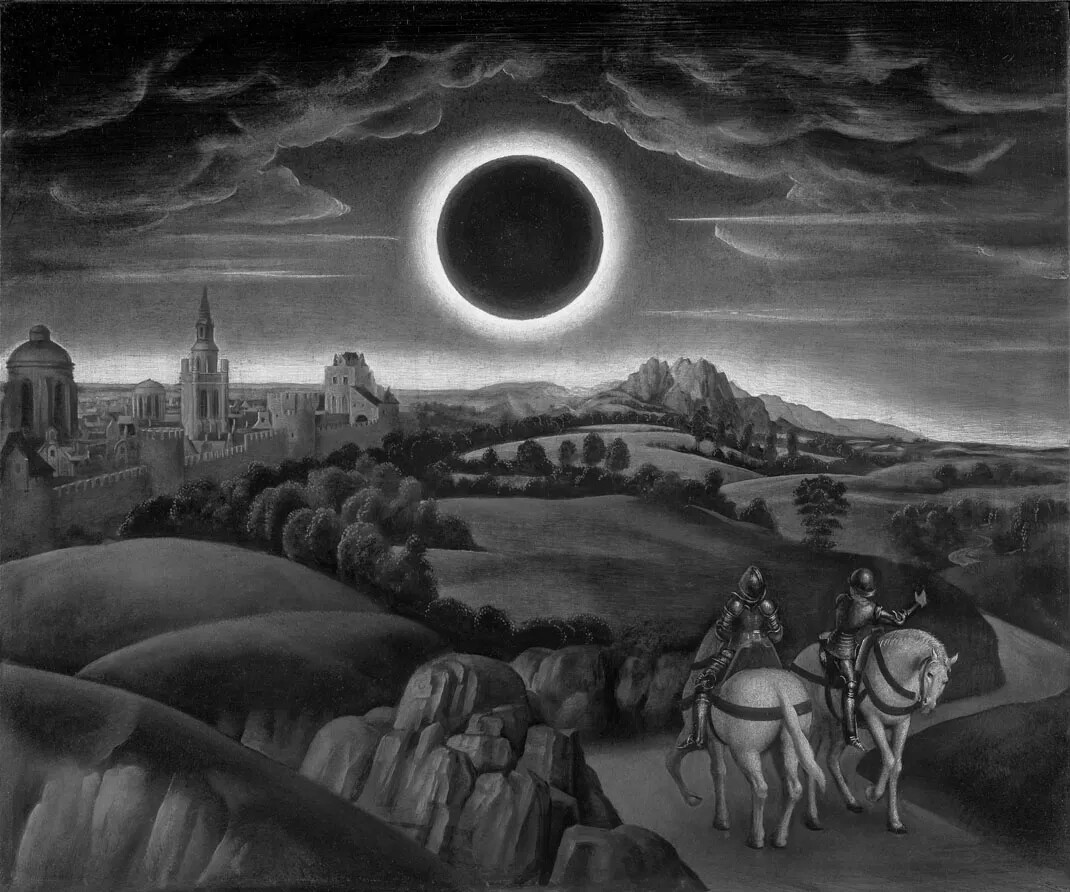
I made a sketch (based on the sketch by @solub) to compare different weightings, and in my humble opinion the Relative Luminance is best (on a screen). You can see for yourselves because I have uploaded the results at the end of the message.
I have also uploaded a conversion made in Adobe Illustrator \> Edit Colors \> Convert to Grayscale. Seems like Adobe also uses Relative Luminance…?
```auto
from __future__ import print_function
def setup():
size(1070, 892)
global img
img = loadImage("2018_431_IN3_RET.png")
def draw():
if mouseX <= img.width/4:
image(img, 0, 0)
elif mouseX > img.width/4 and mouseX <= img.width/2:
weight_R = 54
weight_G = 183
weight_B = 18
image(relative_luminance(img, weight_R, weight_G, weight_B), 0, 0)
elif mouseX > img.width/2 and mouseX <= (img.width/4)*3:
weight_R = 77
weight_G = 151
weight_B = 28
image(relative_luminance(img, weight_R, weight_G, weight_B), 0, 0)
else:
weight_R = 85
weight_G = 85
weight_B = 85
image(relative_luminance(img, weight_R, weight_G, weight_B), 0, 0)
line(img.width/4, img.height - 50, img.width/4, img.height)
line(img.width/2, img.height - 50, img.width/2, img.height)
line((img.width/4)*3, img.height - 50, (img.width/4)*3, img.height)
if ((keyPressed) and (key == 'p')):
save("something.jpg")
def relative_luminance(img, weight_R, weight_G, weight_B):
"""
Convert the image to grayscale using true relative luminance weights and bit shifting.
Reference -> https://en.wikipedia.org/wiki/Relative_luminance
"""
lum_img = createImage(img.width, img.height, RGB)
img.loadPixels()
lum_img.loadPixels()
for i in range(len(img.pixels)):
col = img.pixels[i]
# Extract RGB components using bit shifts
r = (col >> 16) & 0xff # Red component
g = (col >> 8) & 0xff # Green component
b = col & 0xff # Blue component
# Calculate the true relative luminance using scaled weights:
lum = (weight_R * r + weight_G * g + weight_B * b) >> 8 # Bit-shift by 8 (dividing by 256)
# Set the grayscale pixel by combining the luminance value into RGB format
lum_img.pixels[i] = (col & 0xff000000) | (lum << 16) | (lum << 8) | lum
lum_img.updatePixels()
return lum_img
```


---
### Author:  [@paulstgeorge](https://discourse.processing.org/u/paulstgeorge)
#### Post date: [October 13, 2024, 1:51pm UTC](https://discourse.processing.org/t/color-to-grayscale-algorithm/45171/7 "2024-10-13T13:51:59Z")
@solub
If the RGB components are extracted using
```auto
r = red(col)
g = green(col)
b = blue(col)
```
What would these line then be?
```auto
# Calculate the true relative luminance using scaled weights:
lum = (weight_R * r + weight_G * g + weight_B * b) >> 8 # Bit-shift by 8 (dividing by 256)
# Set the grayscale pixel by combining the luminance value into RGB format
lum_img.pixels[i] = (col & 0xff000000) | (lum << 16) | (lum << 8) | lum
```
Please and thank you,
---
### Author:  [@glv](https://discourse.processing.org/u/glv)
#### Post date: [October 13, 2024, 2:10pm UTC](https://discourse.processing.org/t/color-to-grayscale-algorithm/45171/8 "2024-10-13T14:10:52Z")
> [@paulstgeorge](#):
>
> If the RGB components are extracted using
>
> ```auto
> r = red(col)
> g = green(col)
> b = blue(col)
>
> ```
Processing Java version:
```auto
/*
Project: Grayscale
Author: GLV
Date: 2024-10-12
Version: 1.0.0
*/
// References:
// https://github.com/benfry/processing4/blob/main/core/src/processing/core/PImage.java#L874
// https://en.wikipedia.org/wiki/Grayscale#Converting_color_to_grayscale
String url = "http://learningprocessing.com/code/assets/sunflower.jpg";
PImage img, img0;
int h, w;
void settings()
{
img0 = loadImage(url);
img0.resize(400, 400);
w = img0.width;
h = img0.height;
println(w, h);
size(w, h);
}
//void setup()
// {
// }
void draw()
{
img = img0.copy();
img.loadPixels();
int lum = 0;
int mx = mouseX;
for(int y=0; y
### Author:  [@paulstgeorge](https://discourse.processing.org/u/paulstgeorge)
#### Post date: [October 13, 2024, 4:20pm UTC](https://discourse.processing.org/t/color-to-grayscale-algorithm/45171/9 "2024-10-13T16:20:37Z")
@glv Thanks ever so. I am trying to understand.
What is (int)?
I would love to know what is going on in the Python line:
`lum_img.pixels[i] = (col & 0xff000000) | (lum << 16) | (lum << 8) | lum`
I understand bit shifting is faster, but I like to develop in a plonky clear way and then make the code efficient at the end. I plan to add in some other features such as turning the image into a photographic negative, white point, etc.
---
### Author:  [@glv](https://discourse.processing.org/u/glv)
#### Post date: [October 15, 2024, 5:58pm UTC](https://discourse.processing.org/t/color-to-grayscale-algorithm/45171/10 "2024-10-15T17:58:50Z")
> [@paulstgeorge](#):
>
> What is (int)?
[https://runestone.academy/ns/books/published/csjava/Unit1-Getting-Started/topic-1-6-casting.html](https://runestone.academy/ns/books/published/csjava/Unit1-Getting-Started/topic-1-6-casting.html)
---
### Author:  [@paulstgeorge](https://discourse.processing.org/u/paulstgeorge)
#### Post date: [October 15, 2024, 6:56pm UTC](https://discourse.processing.org/t/color-to-grayscale-algorithm/45171/11 "2024-10-15T18:56:40Z")
Thanks @glv
I am familiar with casting a double to a float in a similar way:
```auto
double dopple = 6.28318530717958647693d;
float boat = (float) dopple;
```
because float() expects an integer and not a double
`float ship = float(dopple); //does not work`
But why (int) somenumber and not int(somenumber)???
---
### Author:  [@glv](https://discourse.processing.org/u/glv)
#### Post date: [October 15, 2024, 8:45pm UTC](https://discourse.processing.org/t/color-to-grayscale-algorithm/45171/12 "2024-10-15T20:45:14Z")
> [@paulstgeorge](#):
>
> But why (int) somenumber and not int(somenumber)???
Sketch:
```auto
int i = int(3.3333);
println(i);
int j = (int) 3.3333;
println(j);
int k = parseInt(3.3333);
println(k);
```
This is what Processing generates:
```auto
/* autogenerated by Processing revision 1293 on 2024-10-16 */
import processing.core.*;
import processing.data.*;
import processing.event.*;
import processing.opengl.*;
import java.util.HashMap;
import java.util.ArrayList;
import java.io.File;
import java.io.BufferedReader;
import java.io.PrintWriter;
import java.io.InputStream;
import java.io.OutputStream;
import java.io.IOException;
public class sketch_241016a extends PApplet {
public void setup() {
int i = PApplet.parseInt(3.3333f);
println(i);
int j = (int) 3.3333f;
println(j);
int k = parseInt(3.3333f);
println(k);
noLoop();
}
static public void main(String[] passedArgs) {
String[] appletArgs = new String[] { "sketch_241016a" };
if (passedArgs != null) {
PApplet.main(concat(appletArgs, passedArgs));
} else {
PApplet.main(appletArgs);
}
}
}
```
Source may provide some insight:
_[processing4/core/src/processing/core/PApplet.java at main · benfry/processing4 · GitHub](https://github.com/benfry/processing4/blob/main/core/src/processing/core/PApplet.java#L8618)_
`:)`
---
### Author:  [@glv](https://discourse.processing.org/u/glv)
#### Post date: [November 9, 2024, 10:11am UTC](https://discourse.processing.org/t/color-to-grayscale-algorithm/45171/13 "2024-11-09T10:11:15Z")
Hello @micycle,
> [@micycle](#):
>
> RGB in Processing already is gamma-corrected
It is not clear what is meant by this.
An sRGB image is gamma encoded and will display correctly on a gamma-corrected display (LCD monitors do this).
`:)`
---
### Author:  [@glv](https://discourse.processing.org/u/glv)
#### Post date: [November 9, 2024, 10:30am UTC](https://discourse.processing.org/t/color-to-grayscale-algorithm/45171/14 "2024-11-09T10:30:53Z")
Hello @solub,
> [@solub](#):
>
> For comparison, here’s what the grayscale conversion function would look like if it used perceptual precision weightings.
```auto
# Calculate the true relative luminance using scaled weights:
# Luminance = 0.2126 * Red + 0.7152 * Green + 0.0722 * Blue
# Approximation: 0.2126 * 256 = 54, 0.7152 * 256 = 183, 0.0722 * 256 = 18
lum = (54 * r + 183 * g + 18 * b) >> 8 # Bit-shift by 8 (dividing by 256)
```
Your code is applied to an sRGB image (assumed and these are gamma-compressed) and meets the definition of luma as per:

_[Grayscale - Wikipedia](https://en.wikipedia.org/wiki/Grayscale)_ states:

Coding the above (formulas in the Wikipedia page) was a fun exercise and results are quite striking compared to the other methods.
References:
- [sRGB - Wikipedia](https://en.wikipedia.org/wiki/SRGB)
- [Grayscale - Wikipedia](https://en.wikipedia.org/wiki/Grayscale)
- [Relative luminance - Wikipedia](https://en.wikipedia.org/wiki/Relative_luminance)
`:)`
---
### Author:  [@paulstgeorge](https://discourse.processing.org/u/paulstgeorge)
#### Post date: [November 9, 2024, 6:15pm UTC](https://discourse.processing.org/t/color-to-grayscale-algorithm/45171/15 "2024-11-09T18:15:58Z")
> [@glv](#):
>
> Coding the above (formulas in the Wikipedia page) was a fun exercise and results are quite striking compared to the other methods.
Have you done this?? Can we see (please)?
---
### Author:  [@glv](https://discourse.processing.org/u/glv)
#### Post date: [June 24, 2025, 8:16pm UTC](https://discourse.processing.org/t/color-to-grayscale-algorithm/45171/17 "2025-06-24T20:16:15Z")
> [@paulstgeorge](#):
>
> Can we see (please)?
Here you go:
_[Color to Grayscale Exploration](https://discourse.processing.org/t/color-to-grayscale-exploration/46602)_
`:)`
---
### Author:  [@paulstgeorge](https://discourse.processing.org/u/paulstgeorge)
#### Post date: [June 26, 2025, 7:01am UTC](https://discourse.processing.org/t/color-to-grayscale-algorithm/45171/18 "2025-06-26T07:01:46Z")
Wow! Will look now. Thank you for sharing.