# Color - changing RGB values when in HSB colorMode
**URL:** https://discourse.processing.org/t/color-changing-rgb-values-when-in-hsb-colormode/15277
**Category:** Coding Questions
**Created:** [November 6, 2019, 11:21am UTC](https://discourse.processing.org/t/color-changing-rgb-values-when-in-hsb-colormode/15277 "2019-11-06T11:21:11Z")
**Posts on this page:** 15
**Page:** 2
### Author:  [@noel](https://discourse.processing.org/u/noel)
#### Post date: [November 12, 2019, 9:03pm UTC](https://discourse.processing.org/t/color-changing-rgb-values-when-in-hsb-colormode/15277/21 "2019-11-12T21:03:06Z")
> [@paulstgeorge](#):
>
> Is there a typo
Yes, hehe,. I change between 3 different languages all the time, and often forget to switch the keyboard idioms. But I fixed it.
---
### Author:  [@Lexyth](https://discourse.processing.org/u/Lexyth)
#### Post date: [November 12, 2019, 10:28pm UTC](https://discourse.processing.org/t/color-changing-rgb-values-when-in-hsb-colormode/15277/22 "2019-11-12T22:28:07Z")
> [@paulstgeorge](#):
>
> So, small question, does it make more sense to work in RGB mode and find the value of H, S, and B when I need to (rather than work in HSB mode and find the value of R, G, or B when needs be)?
Since jeremydouglass already took care of the big question, so i‘m gonna go with the small one 😅
It‘s probably better to work in RGB, since the values are set directly, without many calculations/conversions, while HSB would always convert values back and forth…
For example :
```auto
color c = color(255,255,255,255); //32-bit
// I‘ll write down an abstract version of the red()/hue() functions, to show what i mean.
float red = red(c);
float hue = hue(c);
float red(color col) {
float r = col.getBits(col, 0, 7).toFloat(); //just pseudo code, to show that the first 8 Bits represent red
return r;
}
// on the other hand hue would be like this...
float hue(color col) {
float r = col.getBits(col, 0, 7).toFloat();
float g = col.getBits(col, 0, 7).toFloat();
float b = col.getBits(col, 0, 7).toFloat();
float h = (r/255)*((g/255)*255)*((b/255)*255*255); //if that really works... idk, but the actual formula is probably at least as complicated as this one
//it has to take in the r, g and b values at the very least.
return h; //return the hue
}
```
So getting a color is pretty straight fortward, but an HSB value is a lot of hidden Math that affects performance (not much, but still).
---
### Author:  [@noel](https://discourse.processing.org/u/noel)
#### Post date: [November 13, 2019, 5:24am UTC](https://discourse.processing.org/t/color-changing-rgb-values-when-in-hsb-colormode/15277/23 "2019-11-13T05:24:35Z")
The way I look at it, is dividing the 360° scale in 6, 60° parts.
6 primary & secondary colors.
For the moment without bit shifting I get:
```auto
void setup() {
// just random color
float r = 34;
float g = 185;
float b = 109;
float h = 0;
color c = color(34, 185, 109);
r /= 255;
g /= 255;
b /= 255;
if (r >= g && g >= b) h = 60 * ((g-b)/(r-b));
if (g > r && r >= b) h = 60 * (2-(r-b)/(g-b));
if (g >= b && b > r) h = 60 * (2+(b-r)/(g-r));
if (b > g && g > r) h = 60 * (4-(g-r)/(b-r));
if (b > r && r >= g) h = 60 * (4+(r-g)/(b-g));
if (r >= b && b > g) h = 60 * (6-(b-g)/(r-g));
println(h);
colorMode(HSB, 360, 100, 100);
println(hue(c));
}
```
---
### Author:  [@paulstgeorge](https://discourse.processing.org/u/paulstgeorge)
#### Post date: [November 13, 2019, 8:39am UTC](https://discourse.processing.org/t/color-changing-rgb-values-when-in-hsb-colormode/15277/24 "2019-11-13T08:39:20Z")
Excellent. Thank you! That’s
what I’ll do then.
Paul
---
### Author:  [@paulstgeorge](https://discourse.processing.org/u/paulstgeorge)
#### Post date: [November 13, 2019, 9:14am UTC](https://discourse.processing.org/t/color-changing-rgb-values-when-in-hsb-colormode/15277/25 "2019-11-13T09:14:29Z")
QED!
That’s a pretty convincing demonstration of the maths behind hue().
Is it even better if we add chue()?
```auto
void setup() {
// just random color
float r = 34;
float g = 185;
float b = 109;
float h = 0;
color c = color(34, 185, 109);
r /= 255;
g /= 255;
b /= 255;
float chue = (hue(c)/255)*360;
if (r >= g && g >= b) h = 60 * ((g-b)/(r-b));
if (g > r && r >= b) h = 60 * (2-(r-b)/(g-b));
if (g >= b && b > r) h = 60 * (2+(b-r)/(g-r));
if (b > g && g > r) h = 60 * (4-(g-r)/(b-r));
if (b > r && r >= g) h = 60 * (4+(r-g)/(b-g));
if (r >= b && b > g) h = 60 * (6-(b-g)/(r-g));
println(h);
println(chue);
colorMode(HSB, 360, 100, 100);
println(hue(c));
}
```
–149.80132
–149.80133
–149.80133
---
### Author:  [@noel](https://discourse.processing.org/u/noel)
#### Post date: [November 13, 2019, 9:58am UTC](https://discourse.processing.org/t/color-changing-rgb-values-when-in-hsb-colormode/15277/26 "2019-11-13T09:58:29Z")
> [@paulstgeorge](#):
>
> That’s
> what I’ll do then.
Actually I also had some coincidents when applying some random numbers, given aproximating good results But it’s not the right formula. Now I’m gooing to google. I want to know the real formula.
---
### Author:  [@paulstgeorge](https://discourse.processing.org/u/paulstgeorge)
#### Post date: [November 13, 2019, 10:08am UTC](https://discourse.processing.org/t/color-changing-rgb-values-when-in-hsb-colormode/15277/27 "2019-11-13T10:08:07Z")
Thank you for the colorspace library (Chroma). I had only looked in [https://processing.org/reference/libraries/](https://processing.org/reference/libraries/). You say there are several. Is there a library of libraries so I can find others in the future?
Your question. I am trying to make a tool _and_ I am learning some Processing as I do. I am happy to use red(), brightness(), etc. I had avoided push and pop style because I want to do all my readings at the same time, but I will keep that door open.
If the methods already exist I have no desire to reinvent them and speed is not an issue. My overriding aim is to use Processing to present the information about a preselected colour in an easily accessible way so it can lead to knowledge and understanding.
Ignoring the relationships between two or more colours (this is already well-covered) I want to put some ‘good’ colours into my simple tool and then see the underlying values and qualities of the colour. Of course at first the values will be numbers but I want to use visualisation techniques so the data is more immediately understood.
You don’t need to read this next bit as it is outside Processing.
As you probably know, competent listeners get increasingly skilled at categorisation. They can recognise phonemes even when distorted by dialect, accent, etc. Whereas competent visual artists get increasingly skilled at discrimination. At first we talk about red, blue and yellow and then artists and other experts see a larger and larger number of colours (reddish orange, salmon pink, etc.). This is what I mean by ‘good’ colours.
---
### Author:  [@paulstgeorge](https://discourse.processing.org/u/paulstgeorge)
#### Post date: [November 13, 2019, 11:38am UTC](https://discourse.processing.org/t/color-changing-rgb-values-when-in-hsb-colormode/15277/28 "2019-11-13T11:38:52Z")
Noel, right formula for what? If it is hue(), then Jeremy has provided:
> [@jeremydouglass](#):
>
> methods for calculating HSB in Processing
---
### Author:  [@noel](https://discourse.processing.org/u/noel)
#### Post date: [November 13, 2019, 12:14pm UTC](https://discourse.processing.org/t/color-changing-rgb-values-when-in-hsb-colormode/15277/29 "2019-11-13T12:14:05Z")
I’ve read many times that HSB is very close to HSV That, was I was thinking of with the code above, but it isn’t. Wikipedia has a [formula](https://en.m.wikipedia.org/wiki/HSL_and_HSV) that’s something like
```auto
if (r >= g && g >= b) h = 60 * ((g-b)/(r-b));
if (g > r && r >= b) h = 60 * (2-(r-b)/(g-b));
if (g >= b && b > r) h = 60 * (2+(b-r)/(g-r));
if (b > g && g > r) h = 60 * (4-(g-r)/(b-r));
if (b > r && r >= g) h = 60 * (4+(r-g)/(b-g));
if (r >= b && b > g) h = 60 * (6-(b-g)/(r-g));
```
But that doesn’t mach at all with HSB.
So Processing has it’s own method, but I like it.
Yes the method was linked above by jeremydouglass
```auto
float[] colors;
void setup() { // just random color
int r = 24;
int g = 18;
int b = 110;
color c = color(r, g, b);
colors = new float[3];
colorMode(HSB,360,100,100);
println(hue(c));
println(saturation(c));
println(brightness(c));
RGBtoHSB(r, g, b, colors);
println("hue = "+colors[0]*360);
println("saturation = "+colors[1]*100);
println("brightness = "+colors[2]*100);
}
float[] RGBtoHSB(int r, int g, int b, float[] hsbvals) {
float hue, saturation, brightness;
if (hsbvals == null) {
hsbvals = new float[3];
}
int cmax = (r > g) ? r : g;
if (b > cmax) cmax = b;
int cmin = (r < g) ? r : g;
if (b < cmin) cmin = b;
brightness = ((float) cmax) / 255.0f;
if (cmax != 0)
saturation = ((float) (cmax - cmin)) / ((float) cmax);
else
saturation = 0;
if (saturation == 0)
hue = 0;
else {
float redc = ((float) (cmax - r)) / ((float) (cmax - cmin));
float greenc = ((float) (cmax - g)) / ((float) (cmax - cmin));
float bluec = ((float) (cmax - b)) / ((float) (cmax - cmin));
if (r == cmax)
hue = bluec - greenc;
else if (g == cmax)
hue = 2.0f + redc - bluec;
else
hue = 4.0f + greenc - redc;
hue = hue / 6.0f;
if (hue < 0)
hue = hue + 1.0f;
}
hsbvals[0] = hue;
hsbvals[1] = saturation;
hsbvals[2] = brightness;
return hsbvals;
}
```
---
### Author:  [@noel](https://discourse.processing.org/u/noel)
#### Post date: [November 13, 2019, 2:11pm UTC](https://discourse.processing.org/t/color-changing-rgb-values-when-in-hsb-colormode/15277/30 "2019-11-13T14:11:39Z")
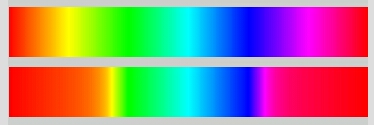
It’s not actually the color space, but rather the positioning.
With this code I get the bars below.
Anyone can tell me where I’m going wrong?
```auto
void setup() {
size(360, 130);
float h = 0;
colorMode(HSB, 360, 100, 100);
for (int i = 1; i <= 360; i++) {
color c = color(i, 100, 100);
stroke(c);
line(i, 10, i, 60);
}
for (int i = 1; i <= 360; i++) {
color c = color(i, 100, 100);
float r = red(c)/255;
float g = green(c)/255;
float b = blue(c)/255;
if (r >= g && g >= b) h = 60 * ((g-b)/(r-b));
if (g > r && r >= b) h = 60 * (2-(r-b)/(g-b));
if (g >= b && b > r) h = 60 * (2+(b-r)/(g-r));
if (b > g && g > r) h = 60 * (4-(g-r)/(b-r));
if (b > r && r >= g) h = 60 * (4+(r-g)/(b-g));
if (r >= b && b > g) h = 60 * (6-(b-g)/(r-g));
stroke(h, 100, 100);
line(i, 70, i, 120);
}
```
---
### Author:  [@jeremydouglass](https://discourse.processing.org/u/jeremydouglass)
#### Post date: [November 13, 2019, 5:09pm UTC](https://discourse.processing.org/t/color-changing-rgb-values-when-in-hsb-colormode/15277/31 "2019-11-13T17:09:08Z")
> [@noel](#):
>
> Anyone can tell me where I’m going wrong?
You are using `float r = red(c)/255;` **after** setting `colorMode(HSB, 360, 100, 100)`. You can’t do that. `red()` scales its output to the current colorMode – dividing by 255 doesn’t make sense, as that presumes a 255 source range, and that isn’t what red is returning.
Try this instead:
```auto
for (int i = 1; i <= 360; i++) {
color c = color(i, 100, 100);
float r = (c >> 16) & 0xff;
float g = (c >> 8) & 0xff;
float b = c & 0xff;
```
Note that this still presumes a colorMode hue range of 360 while building your colors with `color()` – if you change the colorMode HSB range, that will break. You could make your second loop general-purpose by using g.colorModeX to map the spectrum to display across any numerical range – e.g. 0-1.0, or 0-100, et cetera.

---
### Author:  [@noel](https://discourse.processing.org/u/noel)
#### Post date: [November 13, 2019, 6:10pm UTC](https://discourse.processing.org/t/color-changing-rgb-values-when-in-hsb-colormode/15277/32 "2019-11-13T18:10:25Z")
So I spend hours not figuring this out, and you come along and see this in a blink of an eye.
I would like to have you skills.
Thanks a lot!
---
### Author:  [@Lexyth](https://discourse.processing.org/u/Lexyth)
#### Post date: [November 13, 2019, 8:44pm UTC](https://discourse.processing.org/t/color-changing-rgb-values-when-in-hsb-colormode/15277/33 "2019-11-13T20:44:44Z")
> [@Lexyth](#):
>
> ```auto
> int colormode = this.g.colorMode;
> float redHue = this.g.colorModeX; //these are the range
> float greenSaturation = this.g.colorModeY;
> float blueValue = this.g.colorModeZ; // i assume value means brightness...
> float alpha = this.g.colorModeA;
>
> ```
Here are the ways to access the ranges of the different colors/their respective field in HSB (red = hue, green = saturation, blue = brightness).
So setting hue to a range of 360 means setting red to a range of 360.
Setting saturation to 100 also sets green to 100.
Although this saves some space for extra variables, i‘d actually prefer different variables, instead of this colormodeX that dictates both red and hue at the same time… Well, nothing i can do about it…
---
### Author:  [@jeremydouglass](https://discourse.processing.org/u/jeremydouglass)
#### Post date: [November 13, 2019, 11:51pm UTC](https://discourse.processing.org/t/color-changing-rgb-values-when-in-hsb-colormode/15277/34 "2019-11-13T23:51:53Z")
> [@noel](#):
>
> you come along and see this in a blink of an eye
Honestly, when I first looked at it I was confused. I tried altering the second loop size and then a tried resetting colorMode just before the second loop – just to see what would happen. I anticipated a fix, but the output was simply broken in different ways.
Then I re-read the second loop again more slowly. One line at a time, think about what each did. At that point, I saw red()/255, and finally thought “aha”. But if I hadn’t recently been explaining what red did (in this thread) I might still have missed it – and at that point I would have needed to add some testing / println() statements to quickly inspect what was happening and break it down a bit further.
---
### Author:  [@noel](https://discourse.processing.org/u/noel)
#### Post date: [November 14, 2019, 3:39am UTC](https://discourse.processing.org/t/color-changing-rgb-values-when-in-hsb-colormode/15277/35 "2019-11-14T03:39:05Z")
> [@jeremydouglass](#):
>
> I might still have missed it
Yes, but then again; I see you folks, and I won’t say names, to not forget someone,- like those chess masters, who walk around within a table ring and make a move with a short glance, where then, that poor opponent, takes a century to make the counter move.
[Previous page](https://discourse.processing.org/t/color-changing-rgb-values-when-in-hsb-colormode/15277.md?page=1)