# Canvas Scaling with different renderers
**URL:** https://discourse.processing.org/t/canvas-scaling-with-different-renderers/46337
**Category:** Processing
**Created:** [May 6, 2025, 9:26pm UTC](https://discourse.processing.org/t/canvas-scaling-with-different-renderers/46337 "2025-05-06T21:26:16Z")
**Posts on this page:** 3
**Page:** 1
### Author:  [@glv](https://discourse.processing.org/u/glv)
#### Post date: [May 6, 2025, 9:26pm UTC](https://discourse.processing.org/t/canvas-scaling-with-different-renderers/46337/1 "2025-05-06T21:26:16Z")
Hello folks,
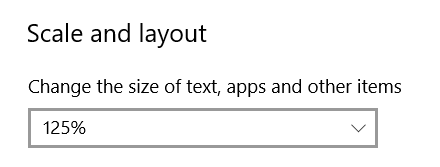
I noticed different scaling for sketch windows on W10 with the following for my _Display settings_ and using different renderers:
Test code:
```auto
import processing.javafx.*;
void setup()
{
size(400, 200);
//size(400, 200, FX2D);
//size(400, 200, P2D);
//size(400, 200, P3D);
background(0);
textAlign(CENTER, CENTER);
textSize(18);
text("0123456789" + "\n" +
"abcdefghijklmnopqrstuvwxyz" + "\n" +
"ABCDEFGHIJKLMNOPQRSTUVWXYZ", width/2, height/2);
}
```
**Processing 4.3.4**
size(400, 200);

size(400, 200, FX2D);

size(400, 200, P2D); // Same for P3D

**Processing 4.4.1**
size(400, 200); // Noticeable aliasing

size(400, 200, FX2D);

size(400, 200, P2D); // Same for P3D

Is this the same for other operating systems? I will check on W11 when I get a chance.
The default renderer for Processing 4.4.1 was the worst case with noticeable aliasing.
The rest appeared fine but scaled differently between Processing versions.
Something has changed under the hood.
How can I control the scaling?
`:)`
---
### Author:  [@stefterv](https://discourse.processing.org/u/stefterv)
#### Post date: [May 7, 2025, 5:32am UTC](https://discourse.processing.org/t/canvas-scaling-with-different-renderers/46337/2 "2025-05-07T05:32:02Z")
Hi @glv Thank you for the clear reporting!
Yes, we changed the default `pixeldensity()` in 4.4.3 when starting sketches on high-dpi screens, to make sure sketches look good on modern displays. I guess this change does not apply to FX2D and I get the feeling I’d want to look into the window sizing on Windows as on macOS the window stays the same size at least.
---
### Author:  [@glv](https://discourse.processing.org/u/glv)
#### Post date: [May 7, 2025, 1:54pm UTC](https://discourse.processing.org/t/canvas-scaling-with-different-renderers/46337/3 "2025-05-07T13:54:25Z")
Hello,
This is the one that most concerned me:
**Processing 4.4.1**
size(400, 200); // Noticeable aliasing

Note:
This topic best viewed on a PC desktop.
The Processing mobile app made them all the same width for viewing! Although they could be opened to see differences but not side by side.
This was for my W10 PC and not yet tested on W11.
And I scale my Windows desktop by 125% so I can read it.
println(pixelDensity); // This is a 1 for my old monitors.
`:)`