# Can I install Processing 4.4.4 on local drive?
**URL:** https://discourse.processing.org/t/can-i-install-processing-4-4-4-on-local-drive/46917
**Category:** Beginners
**Created:** [August 13, 2025, 5:13am UTC](https://discourse.processing.org/t/can-i-install-processing-4-4-4-on-local-drive/46917 "2025-08-13T05:13:47Z")
**Posts on this page:** 8
**Page:** 1
### Author:  [@newuser](https://discourse.processing.org/u/newuser)
#### Post date: [August 13, 2025, 5:13am UTC](https://discourse.processing.org/t/can-i-install-processing-4-4-4-on-local-drive/46917/1 "2025-08-13T05:13:47Z")
OS: Windows 11
I previously installed Processing 4.4.4 “Typical” and it was installed on \>\> `C:\Users\newuser\OneDrive\Documents`but that causes problems with launching when my internet is not working, and also takes about 20% of my OneDrive space.
I uninstalled Processing 4.4.4 because my intentionally-stored-on-OneDrive files were in jeopardy.
Is it possible for me to install Processing on my preferred local drive: `C:\Users\newusesr\Documents` (not “OneDrive”)
---
### Author:  [@stefterv](https://discourse.processing.org/u/stefterv)
#### Post date: [August 13, 2025, 5:16am UTC](https://discourse.processing.org/t/can-i-install-processing-4-4-4-on-local-drive/46917/2 "2025-08-13T05:16:04Z")
If you go into Processings preferences you can select a different folder for the sketchbook
---
### Author:  [@sterretje](https://discourse.processing.org/u/sterretje)
#### Post date: [August 13, 2025, 8:02am UTC](https://discourse.processing.org/t/can-i-install-processing-4-4-4-on-local-drive/46917/3 "2025-08-13T08:02:09Z")
You can download a ZIP from [Releases · processing/processing4 · GitHub](https://github.com/processing/processing4/releases). Scroll down to [Processing 4.4.4](https://github.com/processing/processing4/releases/tag/processing-1304-4.4.4) (or whichever version you need) and download the windows ZIP.
You can install that anywhere.
@stefterv, this is not about the sketchbook but about the Processing application itself.
---
### Author:  [@glv](https://discourse.processing.org/u/glv)
#### Post date: [August 15, 2025, 4:12pm UTC](https://discourse.processing.org/t/can-i-install-processing-4-4-4-on-local-drive/46917/4 "2025-08-15T16:12:59Z")
> [@sterretje](#):
>
> You can install that anywhere.
\*\* **Advanced topics and not for typical installs** \*\*
_ **These are advanced topics. You should know what you are doing and be able to keep track of your custom working environments.** _
I always do a manual install and rename the folder:
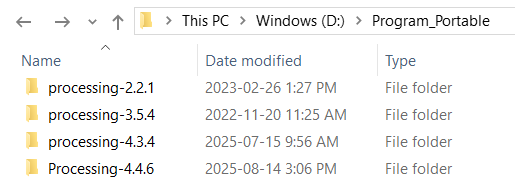
A separate _preferences.txt_ for each environment can be created (if desired) and there are instructions here:
> **[Preferences](https://github.com/processing/processing4/wiki/Preferences)**
>
> Source code for Processing, the software sketchbook and Java-based programming language for students, artists, designers, educators, hobbyists, and creative coders. Includes the core library, and e...
Note:
A separate _preferences.txt_ for each environment does not seem to be working on Processing 4.4.6.
I still have to do more testing on my end.
@stefterv It may be just me. Should I submit an issue?
I found this related issue:
_[Making `Preferences` standalone · Issue #1104 · processing/processing4 · GitHub](https://github.com/processing/processing4/issues/1104)_
The `.msi` installer on Windows does the following:
[Android mode no longer works in Processing 4.4.1 · Issue #777 · processing/processing-android · GitHub](https://github.com/processing/processing-android/issues/777) \< One of the posts discusses this. Good to know just in case!
I customize my environments by launching each with a batch file.
This is necessary for my use in some cases.
Example:
> [@Android Programming for Beginners](https://discourse.processing.org/t/android-programming-for-beginners/46813/16):
>
> That seems to be the case. Minimal details on my end below. Preferences.txt: ANDROID\_SDK=E:\android\sdk JAVA\_HOME=D:\Program\_Portable\Processing-4.4.4\runtime PATH=D:\Program\_Portable\Processing-4.4.4\runtime\bin;E:\android\sdk\platform-tools;E:\android\sdk\cmdline-tools\latest;null android.gradle\_plugin=7.1.0 android.sdk.appcompat=1.6.0 android.sdk.ar=1.37.0 android.sdk.gvr=1.180.0 android.sdk.path=E:\android\sdk android.sdk.play\_services=18.0.0 android.sdk.target=33 android.sdk.target.wear…
`:)`
---
### Author:  [@newuser](https://discourse.processing.org/u/newuser)
#### Post date: [August 17, 2025, 2:52am UTC](https://discourse.processing.org/t/can-i-install-processing-4-4-4-on-local-drive/46917/5 "2025-08-17T02:52:45Z")
> [@stefterv](#):
>
> Processings preferences you can select a different folder for the sketchbook
Yes, thank you. I moved my sketchbook, but then uninstalled Processing to install on a local drive (`c:\Users\newuser\Documents)`to keep it off my OneDrive (which Processing filled to 99%)
> [@sterretje](#):
>
> download a ZIP from [Releases](https://github.com/processing/processing4/releases)
Thank you. I shall try that.
> [@sterretje](#):
>
> install that anywhere
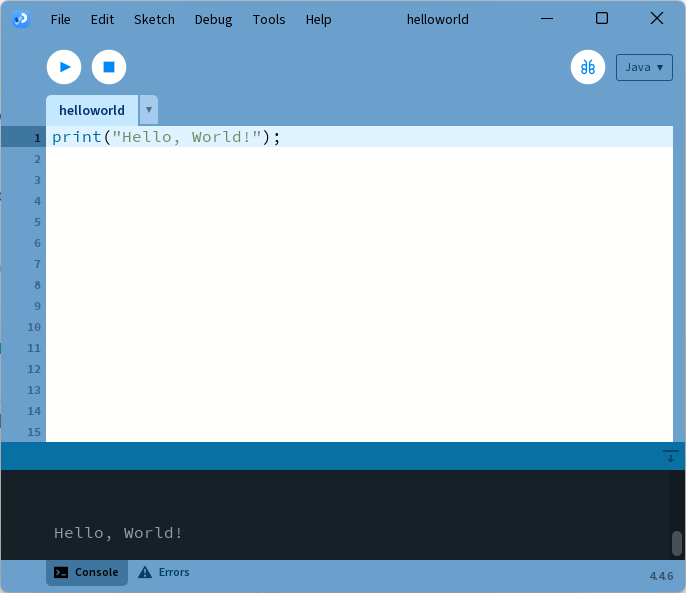
It worked.
---
### Author:  [@glv](https://discourse.processing.org/u/glv)
#### Post date: [August 18, 2025, 12:50pm UTC](https://discourse.processing.org/t/can-i-install-processing-4-4-4-on-local-drive/46917/6 "2025-08-18T12:50:31Z")
> [@sterretje](#):
>
> @stefterv, this is not about the sketchbook but about the Processing application itself.
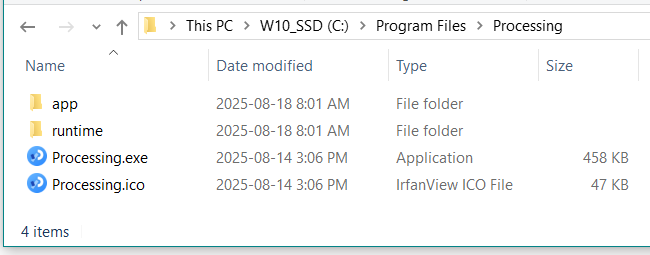
This is the default location for the _Processing application_ (with MSI installer) and _ **does not grow in size** _:
This is the default location for the _sketchbook folder_ which contains the sketches, libraries, modes and _ **does grow in size** _:

Where the **Processing application** and the **sketchbook folder** are stored can be a point of confusion for new users.
The _ **preferences.txt** _ is also in a different location.
I discuss this with new users that I work with.
> [@newuser](#):
>
> I previously installed Processing 4.4.4 “Typical” and it was installed on \>\> `C:\Users\newuser\OneDrive\Documents`but that causes problems with launching when my internet is not working, and also takes about 20% of my OneDrive space.
I would not expect that to be the default installation directory for the _Processing application_ with the MSI installer.
It appears to be the location of the _sketchbook folder_.
I was not able to change the installation directly with the MSI installer.
> [@newuser](#):
>
> Yes, thank you. I moved my sketchbook, but then uninstalled Processing to install on a local drive (`c:\Users\newuser\Documents)`to keep it off my OneDrive (which Processing filled to 99%)
Moving the _sketchbook folder_ appears to be the solution to this folder growing and filling the OneDrive.
@newuser can provide clarity on this after understanding where the different folders are located.
If the _MSI installer_ did install the _Processing application_ to the _OneDrive folder_ with the _Typical install_ this would need to be confirmed.
`:)`
---
### Author:  [@newuser](https://discourse.processing.org/u/newuser)
#### Post date: [August 18, 2025, 7:54pm UTC](https://discourse.processing.org/t/can-i-install-processing-4-4-4-on-local-drive/46917/7 "2025-08-18T19:54:35Z")
> [@glv](#):
>
> provide clarity
I can not provide any clarity, other than “my problem seems to be with Windows.”
I downoladed the Processing .ZIP file to the (local drive) download folder, extracted the .ZIP in (local drive) download folder and launched the Processing .EXE… but somehow all the working folders for Processing landed in OneDrive…Documents… and (local drive) Documents folder is empty.
---
### Author:  [@glv](https://discourse.processing.org/u/glv)
#### Post date: [October 25, 2025, 9:52pm UTC](https://discourse.processing.org/t/can-i-install-processing-4-4-4-on-local-drive/46917/8 "2025-10-25T21:52:58Z")
> [@glv](#):
>
> Note:
> A separate _preferences.txt_ for each environment does not seem to be working on Processing 4.4.6.
> I still have to do more testing on my end.
> @stefterv It may be just me. Should I submit an issue?
> I found this related issue:
> _[Making `Preferences` standalone · Issue #1104 · processing/processing4 · GitHub](https://github.com/processing/processing4/issues/1104)_
\*\*\* UPDATE \*\*\*
_[Preferences · processing/processing4 Wiki · GitHub](https://github.com/processing/processing4/wiki/Preferences#sketchbook-and-settings-location)_
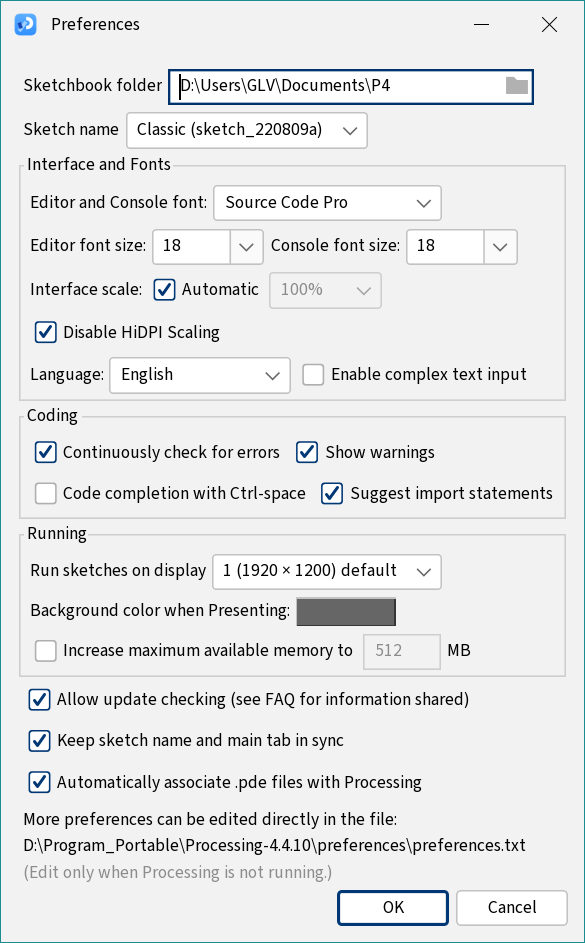
To change the _default_ location of the `preferences.txt` file I used the _lib folder_ here for Processing 4.4.7 and 4.4.10 and it worked:

Yay!
`:)`